Event Info Page
Once your event is created, you can manage all the core details from the Event Info page under Manage Events.
Event Details
This is where you set the basic information for your event. Enter your Event Name, which is what attendees will see on the ticketing page. The Event URL is automatically generated from your event name and will be the link you share publicly (e.g., https://yourevent.fearticket.com). Select the Category that best describes your event (such as Attractions / Halloween / Haunt) and set the correct Event Timezone so your dates and times display accurately for your audience. You can also upload an Event Logo here, the image should be 512 x 512 px and no larger than 2MB.
Event Location
Enter the physical address where your event is taking place. Start typing and select the location from the dropdown. You can add multiple locations if needed by clicking Add Location.
Organizer Details
Select the organization running the event from the Organization Name dropdown. If your organization isn't listed yet, click Add Organization to create one.
Event Publish Status
This controls who can see your event. Setting it to Public means your event is visible on FEARTICKET and searchable by attendees. Your public event link is shown here and can be shared directly with your audience.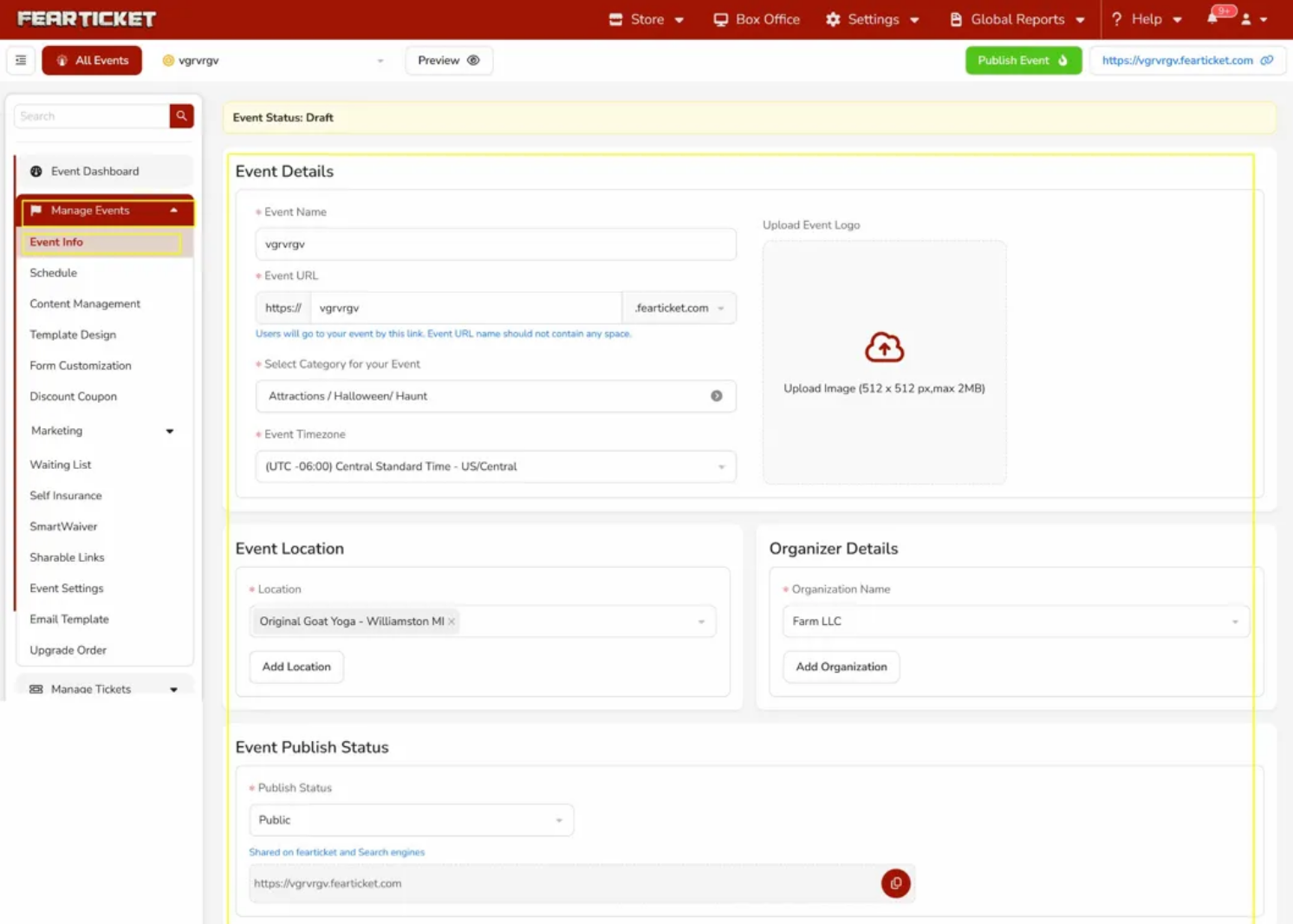
Was this article helpful?
That’s Great!
Thank you for your feedback
Sorry! We couldn't be helpful
Thank you for your feedback
Feedback sent
We appreciate your effort and will try to fix the article