Cash or check transactions can be completed by selecting the appropriate Selling Point when creating or editing a ticket.
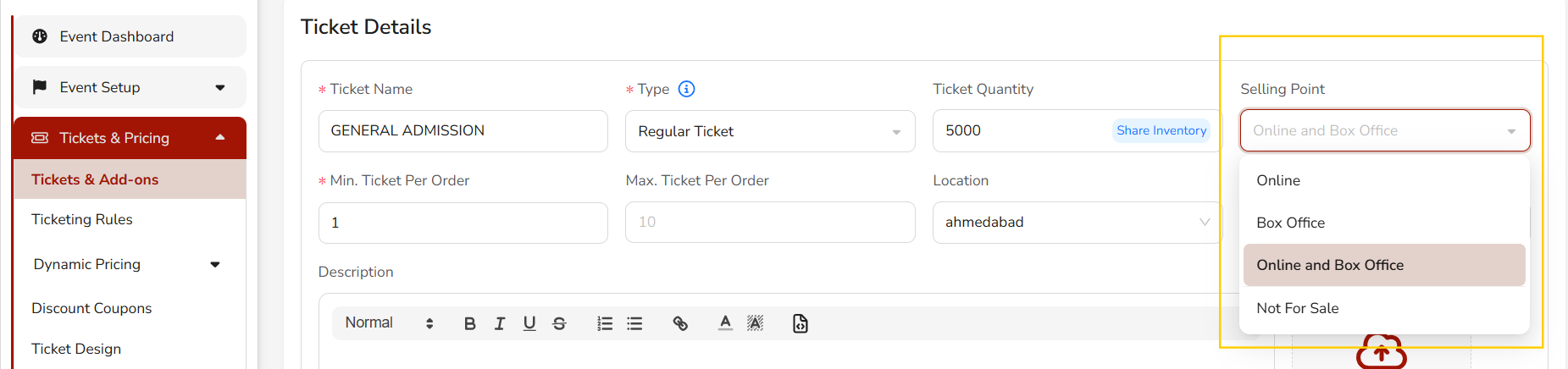
To allow tickets to be sold at the box office (for example when accepting cash or check payments), set the Selling Point to Box Office or Online and Box Office.
Steps
Go to Tickets & Pricing → Tickets & Add-ons.
Open or create a ticket.
In the Selling Point dropdown, choose one of the following options:
Online Tickets are available only for online purchase.
Box Office Tickets can be sold directly at the box office (cash, check, or in-person payments).
Online and Box Office Tickets can be sold both online and at the box office.
Not For Sale Ticket will not be available for purchase.
Ticket Selling Point Setting
Was this article helpful?
That’s Great!
Thank you for your feedback
Sorry! We couldn't be helpful
Thank you for your feedback
Feedback sent
We appreciate your effort and will try to fix the article