FEARTICKET lets you automatically change a ticket's price once a certain number of tickets have been sold. With a Based on Ticket Quantity Sold rule, once your chosen ticket hits the quantity threshold you set, the price updates automatically for every purchase after that. This is useful for tiered pricing, for example raising General Admission from $20 to $25 once the first 50 tickets are sold.
In Tickets & Pricing, click on Rule Builder. Under the template list, find Based on ticket quantity sold and click Use this rule, as shown in the image below.
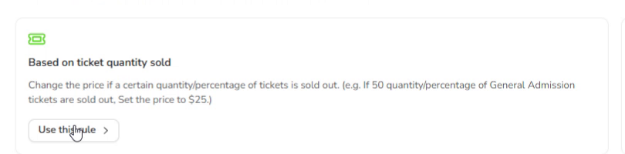
The Based on Ticket Quantity Sold template, found in the Rule Builder template list.
Setting the Condition
Unlike Must Buy rules, this rule needs you to build a condition, since the price only changes once your threshold is hit. At the top you can still name the rule, and there's a checkbox for Stop processing further rules if this matches if you don't want other rules to run once this one applies.
The default condition comes pre-built with two rows. The first row lets you pick which ticket the rule watches, using an Is or Any of operator and a Select a ticket dropdown of your event's ticket types.
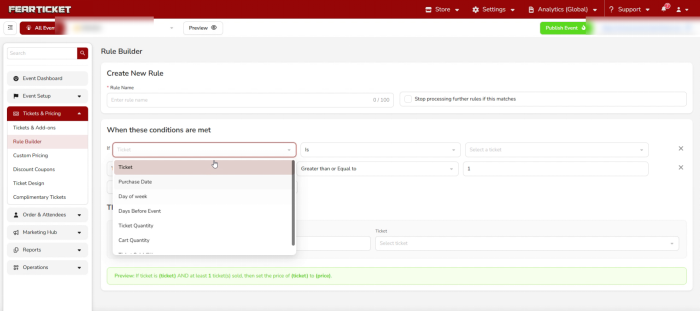
Choosing the field the condition checks, and which ticket the rule watches.
The second row is the threshold itself: Ticket Sold, an operator, and a number. The operator dropdown gives you Is, Greater than or Equal to, Less than or Equal to, Greater than, and Less than, so you can decide exactly when the price should change.
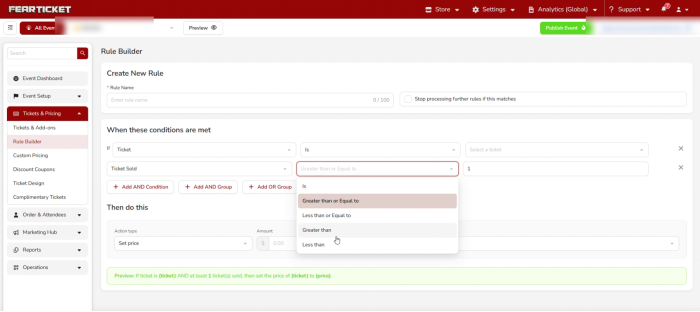
Setting the operator that defines the quantity threshold.
If you need more than a simple threshold, use Add AND Condition, Add AND Group, or Add OR Group below the condition rows to layer in extra logic, like combining a quantity threshold with a specific day of the week.
Setting the Action
Everything for what happens next lives in the Then do this section. Choose an Action type: Set price, Increase price, or Decrease price are the options you'll use most often for a quantity-based rule. Then fill in the Amount and pick the Ticket the action applies to.
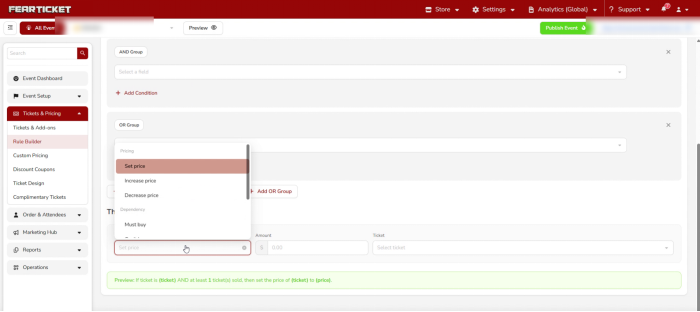
Choosing the action type that runs once the quantity threshold is met.
Reading the Preview Before You Save
FEARTICKET writes a plain English summary of the rule right above the Save button, and it updates automatically as you make your selections. For a basic quantity-sold rule it would read:
If ticket is (ticket) AND at least (number) ticket(s) sold, then set the price of (ticket) to (price).
Once the preview matches what you intended, click Save.
Example
If General Admission sells its 50th ticket, the price automatically changes from $20 to $25 for every purchase after that. Buyers who purchased before the 50th ticket keep their original price, only new sales are affected going forward.
Note: Based on Ticket Quantity Sold rules check your live sales count continuously, so the price change takes effect the moment the threshold is crossed, no manual update needed.
Was this article helpful?
That’s Great!
Thank you for your feedback
Sorry! We couldn't be helpful
Thank you for your feedback
Feedback sent
We appreciate your effort and will try to fix the article