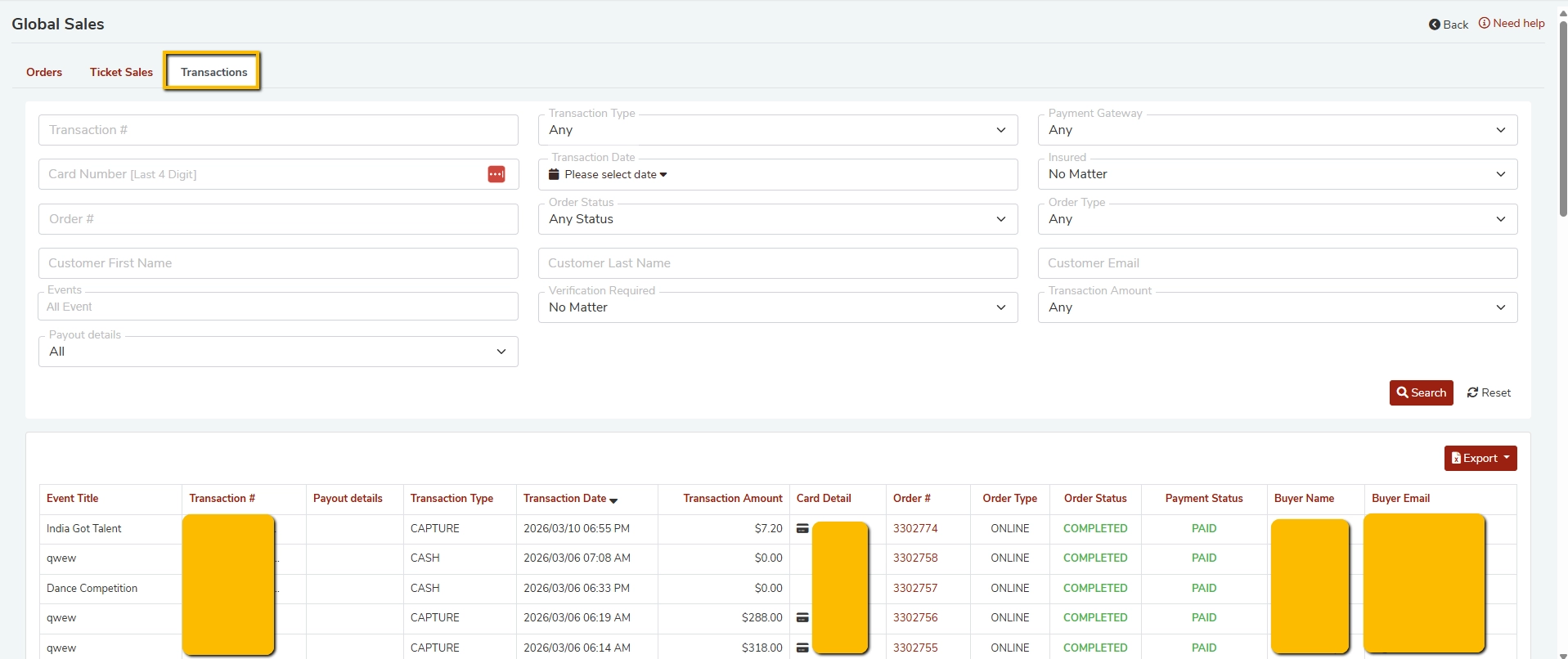
The Transactions tab under Global Sales gives event organizers a comprehensive view of all payment transactions across their events. You can search, filter, and export transaction records to manage your financials with ease.
Frequently Asked Questions
1. What is the Transactions tab in Global Sales?
The Transactions tab displays a detailed log of every payment transaction processed through your FEARTICKET account. Each record includes the event name, transaction number, payment type, date, amount, order details, payment status, and buyer information.
2. How do I access the Transactions section?
- Log in to your FEARTICKET organizer account.
- Navigate to Global Sales from the main menu.
- Click on the Transactions tab (next to Orders and Ticket Sales).
3. What filters are available to search transactions?
You can filter transactions using the following fields:
| Filter | Description |
|---|---|
| Transaction # | Search by a specific transaction ID |
| Card Number (Last 4 Digits) | Filter by the last 4 digits of the card used |
| Order # | Search by order number |
| Customer First / Last Name | Find transactions by buyer name |
| Customer Email | Search by buyer email address |
| Transaction Type | Filter by type (e.g., Capture, Cash) |
| Transaction Date | Select a specific date range |
| Payment Gateway | Filter by the payment processor used |
| Insured | Filter by insurance status |
| Order Status | Filter by status (e.g., Completed, Cancelled) |
| Order Type | Filter by Online or Box Office orders |
| Verification Required | Filter transactions requiring verification |
| Transaction Amount | Filter by a specific amount range |
| Events | Filter transactions for a specific event |
| Payout Details | Filter by payout status |
4. What are the different Transaction Types?
Capture refers to a card payment that was authorized and captured online.
Cash refers to a payment collected in person at the box office. The transaction amount typically shows as $0.00 in the system since cash is handled offline.
5. What does the Order Type column mean?
Online means the ticket was purchased by the buyer through the online ticketing page.
Box Office means the ticket was sold manually by a staff member at the venue using the box office system.
6. What does Payment Status: Paid mean?
A status of Paid confirms that the transaction has been successfully processed and the payment has been collected. Combined with an Order Status of Completed, this means the order is fully fulfilled.
7. Can I export transaction records?
Yes. Click the Export button located at the top right of the results table to download your transaction data. This is useful for accounting, reconciliation, or reporting purposes.
8. How do I reset my search filters?
Click the Reset button next to the Search button to clear all applied filters and start a fresh search.
9. Why does a Cash transaction show $0.00?
Cash transactions processed through the Box Office are recorded as $0.00 in the system because the payment is collected physically. The record still appears in the Transactions log for tracking and auditing purposes.
10. What information is shown in the Transactions table?
Each row in the results table displays the following details:
- Event Title
- Transaction Number
- Payout Details
- Transaction Type
- Transaction Date and Time
- Transaction Amount
- Card Detail (last 4 digits, if applicable)
- Order Number
- Order Type (Online or Box Office)
- Order Status
- Payment Status
- Buyer Name
- Buyer Email
Pro Tip: Use the Transaction Date filter combined with a specific Event filter to quickly pull financial reports for a single event on a particular date. This is especially helpful for post-event reconciliation.
Was this article helpful?
That’s Great!
Thank you for your feedback
Sorry! We couldn't be helpful
Thank you for your feedback
Feedback sent
We appreciate your effort and will try to fix the article