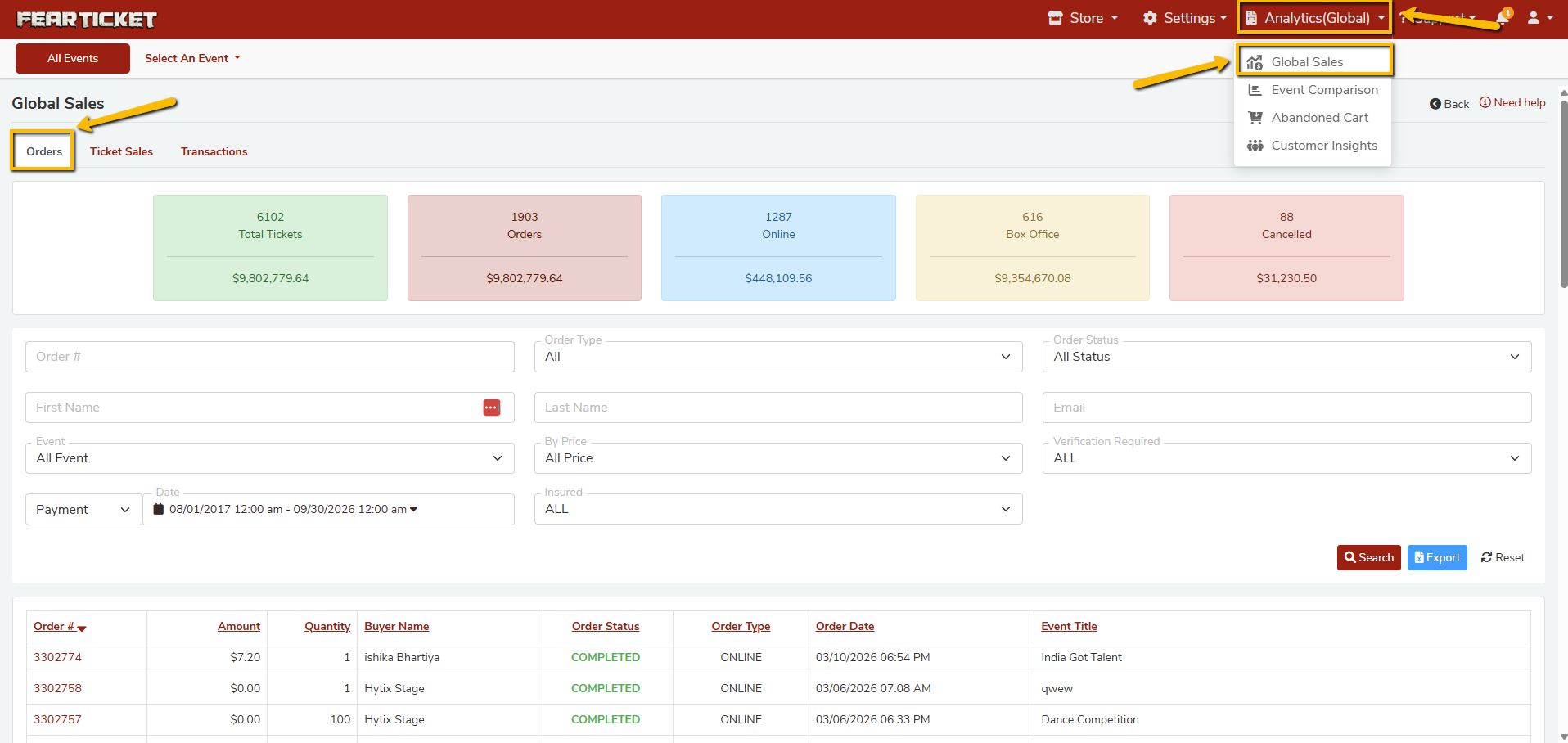
Global Sales is your command center for tracking all ticket revenue and order activity across every event in your FEARTICKET account. Navigate to Analytics (Global) > Global Sales from the top navigation bar to access this section.
Overview
The Global Sales dashboard gives event organizers a bird's-eye view of total sales performance across all events, all channels, and all time periods from a single screen.
Key Metrics at a Glance
At the top of the Global Sales page, you will see five summary cards:
| Metric | Value (Example) | What It Shows |
|---|---|---|
| Total Tickets | 6,102 / $9,802,779.64 | Total number of tickets sold across all events and channels, with total revenue. |
| Orders | 1,903 / $9,802,779.64 | Total number of orders placed and the corresponding revenue. |
| Online | 1,287 / $448,109.56 | Orders placed through the online storefront by customers. |
| Box Office | 616 / $9,354,670.08 | Orders processed in-person via the Box Office system. |
| Cancelled | 88 / $31,230.50 | Total cancelled orders and their combined value. |
Tabs: Orders, Ticket Sales and Transactions
The Global Sales page is divided into three tabs:
- Orders: View individual order records with details like order number, amount, quantity, buyer name, order status, order type, order date, and event title.
- Ticket Sales: Drill down into ticket-level sales data broken down by ticket type.
- Transactions: Review payment transaction records for reconciliation and accounting.
Filters Available on the Orders Tab
You can narrow down your search using the following filters:
| Filter | Options |
|---|---|
| Order # | Enter a specific order number |
| Order Type | All, Online, Box Office |
| Order Status | All Status, Completed, Cancelled, Pending |
| First Name / Last Name | Search by buyer name |
| Search by buyer email | |
| Event | All Events or a specific event |
| By Price | All Price or a specific price range |
| Verification Required | ALL, Yes, No |
| Date | Custom date range (Payment or Order date) |
| Insured | ALL, Yes, No |
After setting your filters, click Search to apply them. Use Reset to clear all filters, or Export to download the results.
Analytics Sub-Menu
Global Sales is one of four reporting tools available under the Analytics (Global) menu:
- Global Sales: Aggregate sales data across all events.
- Event Comparison: Compare performance metrics side-by-side across multiple events.
- Abandoned Cart: Track orders that were started but never completed.
- Customer Insights: Understand your audience with buyer demographic and behavioral data.
Frequently Asked Questions (FAQs)
Q1: How do I access Global Sales?
A: Click on Analytics (Global) in the top navigation bar, then select Global Sales from the dropdown menu.
Q2: What is the difference between Online and Box Office orders?
A:
- Online orders are tickets purchased by customers through your event's public ticketing page.
- Box Office orders are tickets sold in person by your staff using FEARTICKET's Box Office system at the venue.
Q3: What does the Cancelled metric include?
A: The Cancelled card shows the total number of orders that were cancelled along with their combined monetary value. This helps you track refund activity and revenue loss due to cancellations.
Q4: Can I filter Global Sales by a specific event?
A: Yes. Use the Event filter dropdown to narrow results to a specific event. You can also combine it with filters for Order Type, Order Status, Date range, Price, buyer details, Verification Required, and Insured status.
Q5: How do I search for a specific order?
A: Enter any of the following in the search filters and click the Search button:
- Order number
- First name or last name
- Email address
Q6: Can I export my Global Sales data?
A: Yes. Click the Export button at the top-right of the order list to download your filtered sales data. This is useful for accounting, reconciliation, and reporting purposes.
Q7: What date range does Global Sales display by default?
A: By default, the date filter covers a broad range. You can customize this using the Date filter to view sales for any specific time period.
Q8: What order statuses can appear in Global Sales?
A: Orders can have the following statuses:
- Completed: Payment was successfully processed.
- Cancelled: The order was cancelled.
- Pending: The order is awaiting payment or confirmation.
Q9: What is the difference between Global Sales and Event Comparison?
A:
- Global Sales: Aggregates all data into a single view, useful for overall revenue tracking.
- Event Comparison: Lets you compare key metrics between two or more specific events side by side, useful for evaluating which events perform best.
Q10: Does Global Sales show data for all my events at once?
A: Yes. By default, the Event filter is set to All Events, so the dashboard reflects combined data from every event in your account. You can narrow it to a single event at any time.
Pro Tip: Use the Export feature regularly to back up your sales records and share revenue reports with your team or stakeholders.
Was this article helpful?
That’s Great!
Thank you for your feedback
Sorry! We couldn't be helpful
Thank you for your feedback
Feedback sent
We appreciate your effort and will try to fix the article