The Abandoned Cart Report helps event organizers identify potential buyers who added tickets to their cart but did not complete the purchase. Use this report to re-engage lost sales and improve your event's revenue.
How to Access the Abandoned Cart Report
- Log in to your FEARTICKET organizer account.
- Click on Analytics (Global) in the top navigation bar.
- From the dropdown menu, select Abandoned Cart.
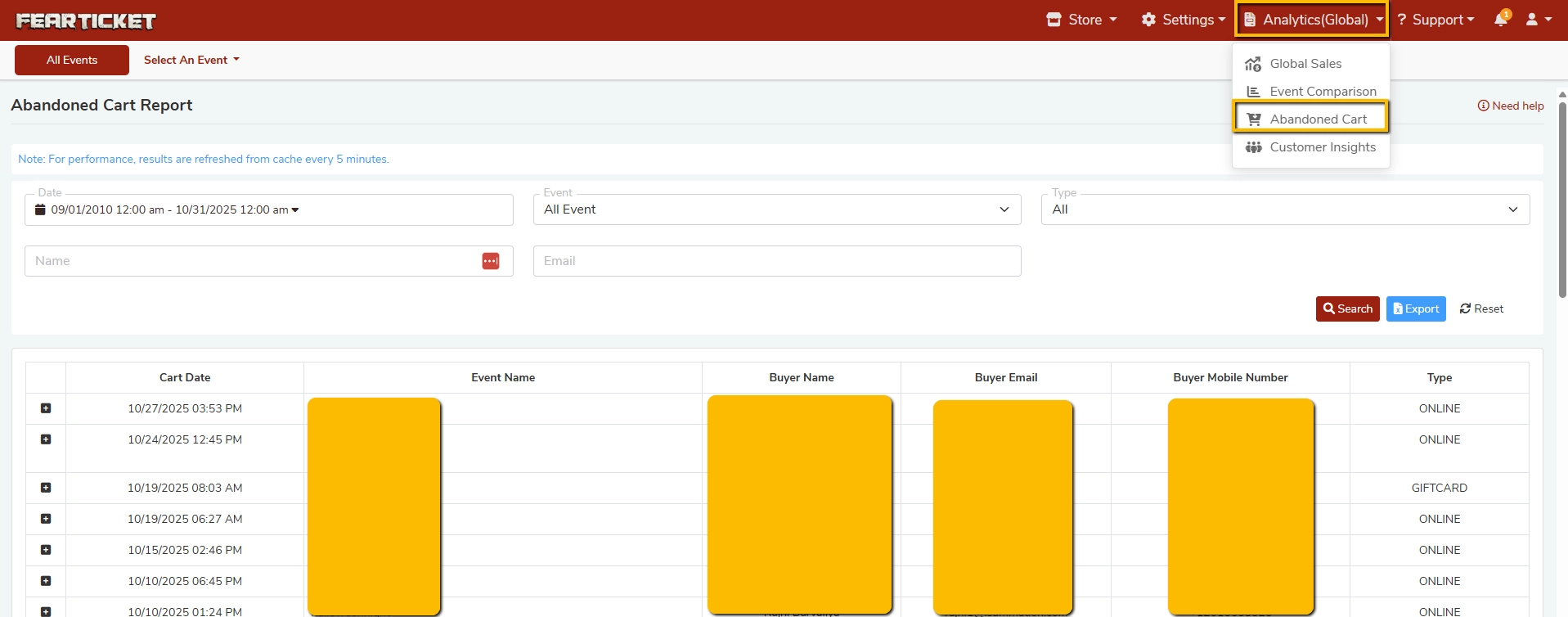
Note: Results in this report are refreshed from cache every 5 minutes for optimal performance.
Filters and Search Options
You can narrow down abandoned cart data using the following filters:
| Filter | Description |
|---|---|
| Date | Filter abandoned carts within a specific date and time range. |
| Event | Select a specific event or view data across all events. |
| Type | Filter by cart type, e.g., Online or Gift Card. |
| Name | Search for a specific buyer by name. |
| Search for a specific buyer by email address. |
After applying your filters, click the Search button to view results.
Report Columns Explained
| Column | Description |
|---|---|
| Cart Date | The date and time when the cart was created or last modified by the buyer. |
| Event Name | The name of the event for which tickets were added to the cart. |
| Buyer Name | The name of the potential buyer who initiated checkout but did not complete it. |
| Buyer Email | The email address of the potential buyer, useful for follow-up campaigns. |
| Buyer Mobile Number | The mobile number provided by the buyer during checkout, if available. |
| Type | Indicates how the cart was initiated: Online (web purchase) or Gift Card. |
Exporting the Report
You can export the abandoned cart data for use in email marketing or CRM tools:
- Apply your desired filters and click Search.
- Click the Export button (blue button, top right of the results table).
- The data will be downloaded in a spreadsheet format.
Tip: Use the exported email list to send targeted follow-up messages or discount offers to recover lost sales.
Frequently Asked Questions (FAQs)
Q1. What is an Abandoned Cart in FEARTICKET?
A: An abandoned cart occurs when a ticket buyer adds tickets to their cart and begins the checkout process but leaves before completing the purchase. The Abandoned Cart Report captures these potential buyers so you can follow up.
Q2. Where do I find the Abandoned Cart Report?
A: Go to Analytics (Global) in the top navigation bar of your organizer dashboard, then select Abandoned Cart from the dropdown.
Q3. How often is the Abandoned Cart Report updated?
A: The report data is refreshed from cache every 5 minutes. If you do not see the latest data, please wait a few minutes and refresh the page.
Q4. Can I filter abandoned carts by a specific event?
A: Yes. Use the Event dropdown filter to select a specific event. By default, it shows data for All Events.
Q5. What cart types appear in the report?
A: The report currently supports two cart types:
- Online - Carts initiated through the online ticketing page.
- Gift Card - Carts initiated using a gift card during checkout.
Q6. Can I search for a specific buyer's abandoned cart?
A: Yes. You can search by Buyer Name or Buyer Email using the search fields at the top of the report.
Q7. Can I export the Abandoned Cart data?
A: Yes. After filtering and searching, click the Export button to download the report as a spreadsheet. This is useful for re-engagement email campaigns.
Q8. Can I send automated emails to buyers who abandoned their cart?
A: The Abandoned Cart Report provides buyer contact details (email and phone number) that you can use to manually reach out or import into an email marketing tool. For automated follow-ups, consider integrating with your preferred email marketing platform.
Q9. How far back does the Abandoned Cart Report go?
A: You can set a custom Date range in the filter. The default range shown is a broad historical window. Adjust the start and end dates to view the period most relevant to you.
Q10. Why is some buyer information missing in the report?
A: Buyer contact information (name, email, mobile) is only captured if the buyer entered it before abandoning the cart. If they left the checkout very early, some fields may be empty.
Best Practice: Regularly review your Abandoned Cart Report, especially during peak haunt season, and reach out to potential buyers with a friendly reminder or a special offer to convert lost carts into confirmed ticket sales.
Was this article helpful?
That’s Great!
Thank you for your feedback
Sorry! We couldn't be helpful
Thank you for your feedback
Feedback sent
We appreciate your effort and will try to fix the article