Affiliate Links allow event organizers to create trackable, shareable URLs that can be distributed to promoters, partners, or influencers. Each link captures visitor traffic, orders, and revenue data so you can measure the performance of every promotional partnership.
Frequently Asked Questions
Q: What are Affiliate Links in FEARTICKET?
Affiliate Links are custom, trackable URLs tied to your event. When a ticket buyer uses an affiliate link to visit your event page and makes a purchase, FEARTICKET records the visit and order against that specific link, giving you full visibility into which promoter or channel drove the sale.
Q: Where can I find Affiliate Links?
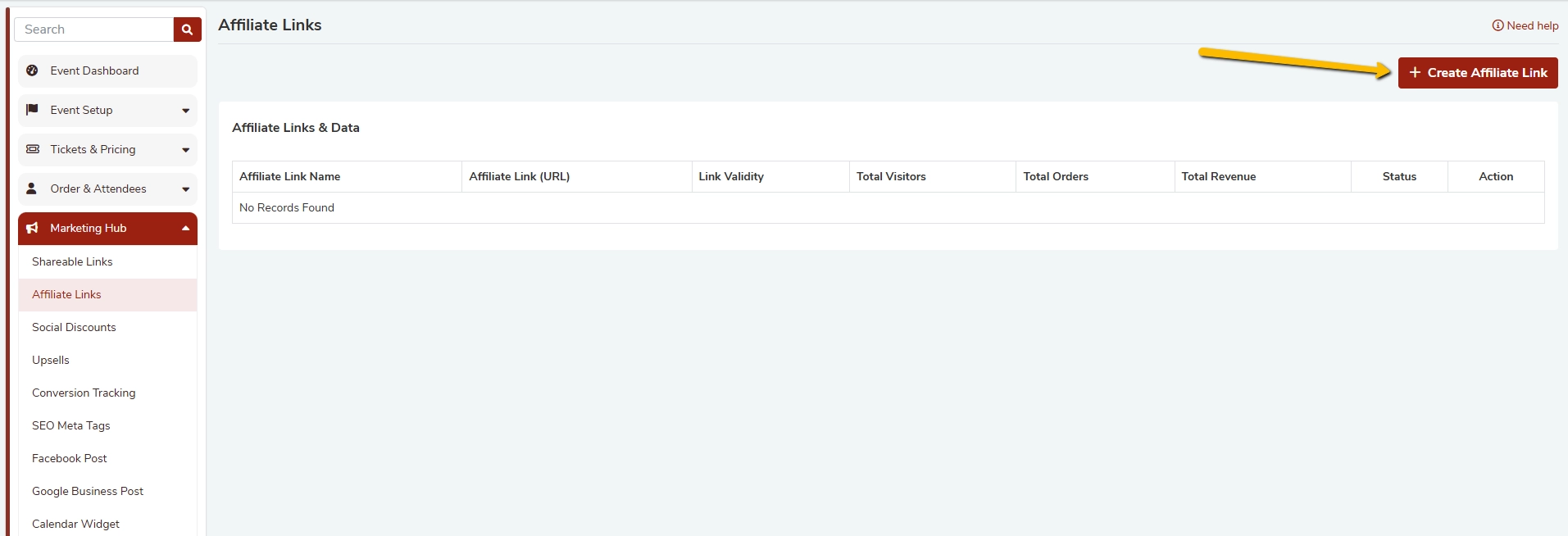
Go to your Event Dashboard > Marketing Hub > Affiliate Links. You will see a table listing all existing affiliate links along with their performance data.
Q: What data does FEARTICKET track for each Affiliate Link?
For every affiliate link, FEARTICKET tracks:
- Total Visitors - number of unique visits through the link
- Total Orders - number of completed ticket purchases
- Total Revenue - total revenue generated through the link
- Status - whether the link is currently active or expired
Creating an Affiliate Link
Q: How do I create a new Affiliate Link?
Follow these steps:
- Navigate to Marketing Hub > Affiliate Links.
- Click the + Create Affiliate Link button in the top-right corner.
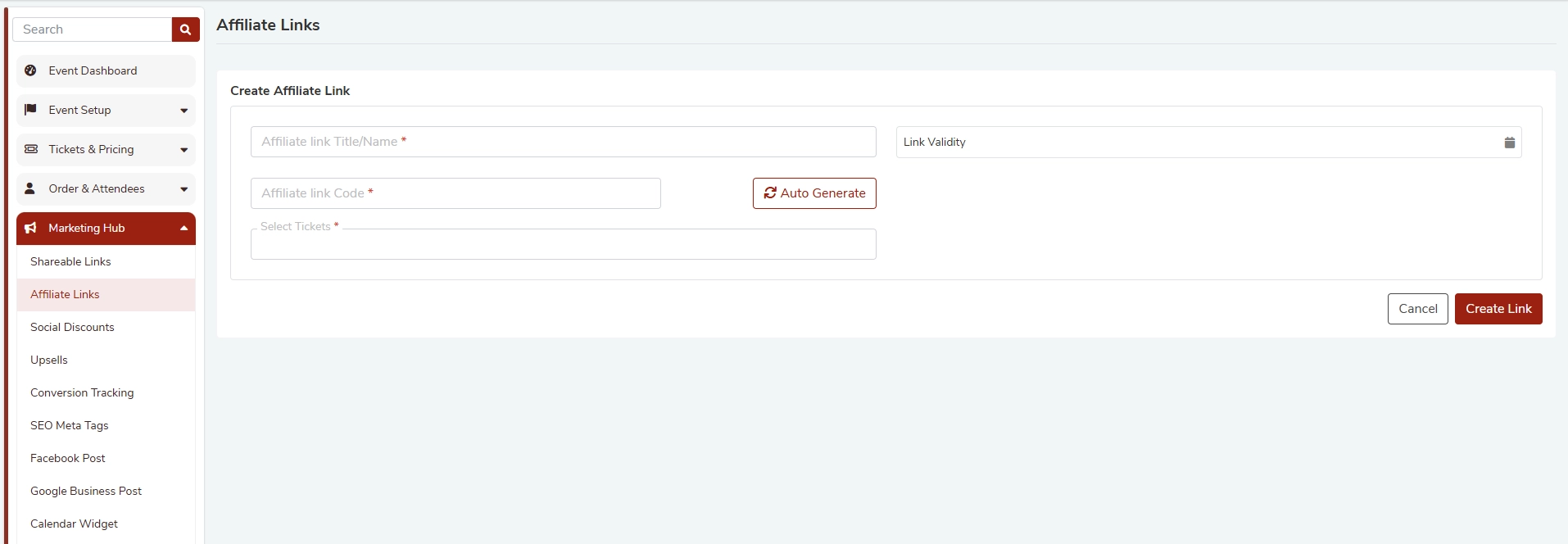
- Fill in the required fields (see below).
- Click Create Link to save.
Q: What fields are required when creating an Affiliate Link?
| Field | Required | Description |
|---|---|---|
| Affiliate Link Title / Name | Yes | A descriptive label to identify the affiliate (e.g., Instagram - John Doe) |
| Affiliate Link Code | Yes | A unique code appended to your event URL. Can be typed manually or auto generated. |
| Link Validity | Optional | A date range during which the link is active. Leave blank for no expiry. |
| Select Tickets | Yes | Choose which ticket types are accessible through this affiliate link. |
Q: What is the Affiliate Link Code?
The affiliate link code is a short, unique identifier that is appended to your event URL to distinguish one affiliate's traffic from another. For example:
https://fearticket.com/your-event?ref=JOHNSMITH
You can type a custom code or click Auto Generate to let FEARTICKET create one for you.
Q: Can I set an expiry date for an Affiliate Link?
Yes. Use the Link Validity field when creating the link to set a date range. Once the end date passes, the link will no longer be active and will not track new visits or orders. If you leave this field blank, the link remains active indefinitely.
Q: Can I restrict an Affiliate Link to specific ticket types?
Yes. The Select Tickets field lets you choose which ticket types are available when a buyer arrives through a particular affiliate link. This is useful if a promoter is only responsible for selling, say, VIP tickets.
Q: Can I auto-generate the Affiliate Link Code?
Yes. Click the Auto Generate button next to the Affiliate Link Code field and FEARTICKET will automatically create a unique code for you. You can still edit it manually after generation if you prefer a custom code.
Managing Affiliate Links
Q: Can I edit an Affiliate Link after it has been created?
Yes. In the Affiliate Links table, use the Action column options to edit an existing link's details such as its name, validity, or ticket selection.
Q: Can I deactivate or delete an Affiliate Link?
Yes. Each link in the table has an Action option that allows you to change its status or remove it. Deactivating a link stops it from tracking new visits without deleting its historical data.
Q: How many Affiliate Links can I create per event?
There is no stated limit on the number of affiliate links per event. you can create as many links as you need, one per promoter, channel, or campaign.
Best Practices
Tips for using Affiliate Links effectively:
- Use a clear naming convention for your links (e.g., Promoter Name - Platform - Campaign) so your table stays organised as you scale.
- Assign unique links to every promoter or marketing channel to accurately attribute revenue.
- Set a Link Validity date that aligns with each promoter's campaign window to automatically deactivate links after the promotion ends.
- Use Select Tickets to give promoters access only to the ticket types they are selling, reducing the chance of buyer confusion.
- Regularly review the Total Visitors, Total Orders, and Total Revenue columns to identify your top-performing affiliates and double down on what works. </aside>
Was this article helpful?
That’s Great!
Thank you for your feedback
Sorry! We couldn't be helpful
Thank you for your feedback
Feedback sent
We appreciate your effort and will try to fix the article