FEARTICKET gives you one place to track how you get paid, what you're charged, what you owe, and the tax details your payouts depend on. You'll find it under Settings, and it's organized into six tabs: Overview, Payouts, Billing, Invoices, Disputes, and Compliance. This article walks through each one.
From the top navigation, open Settings and click Account & Billing. The page opens on the Overview tab. The dropdown in the top right lets you switch the payment account the page is showing.
Overview
The Overview tab is your at-a-glance summary. Available for payout shows where every dollar you've earned currently sits, split across Pending, Available, and In transit, until it reaches your bank. Needs Your Attention flags anything that requires action, and reads as clear when there's nothing outstanding.
On the right, the Go to a section panel links you into the other tabs. The Payouts card shows your payout status and where your money is being sent, Billing shows your plan and current fee cycle, Invoices shows whether anything is open, and Compliance flags any tax form that needs review.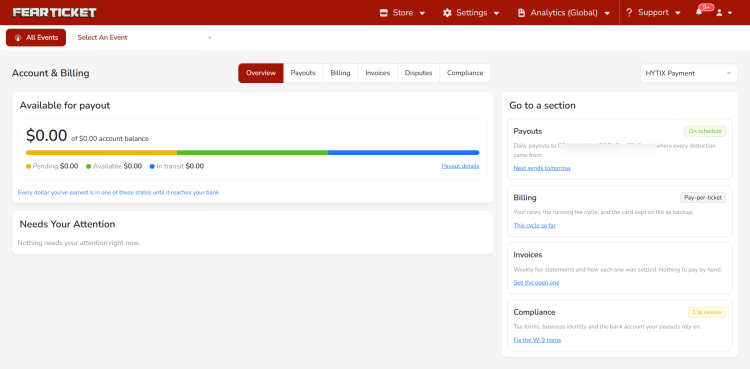
Payouts
The Payouts tab is where you track money moving to your bank. The Payout Summary across the top breaks down buyers paid, Hytix and card fees, refunds and disputes, amounts held in reserve, and what was ultimately paid to you.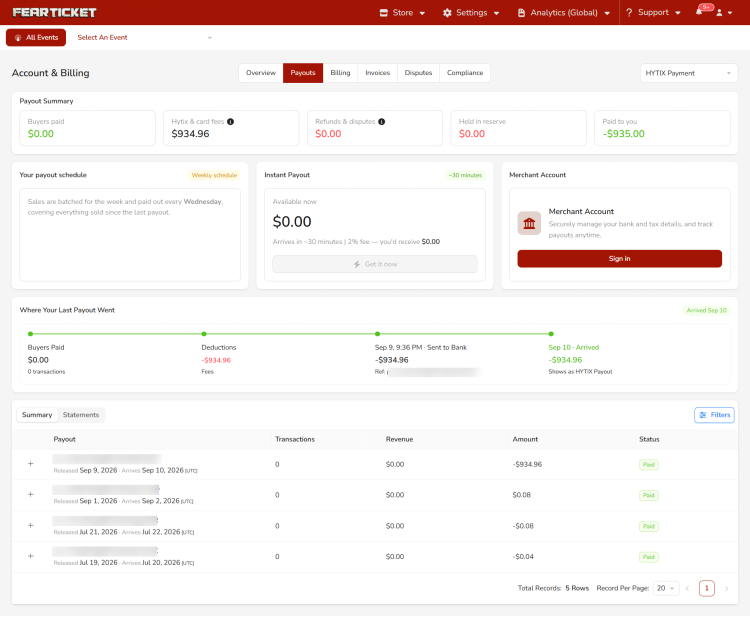
Schedule, Instant Payout, and Merchant Account
Your payout schedule explains your regular cadence, for example weekly payouts covering everything sold since the last one. Instant Payout lets you pull available funds early for a 2% fee, arriving in roughly 30 minutes. The Merchant Account card is where you sign in to manage your bank and tax details and track payouts.
Where Your Last Payout Went and History
The Where Your Last Payout Went timeline traces your most recent payout from buyers paid, through deductions, to sent and arrived at your bank. Below it, the Summary and Statements views list your past payouts with their transactions, revenue, amount, and status, with Filters to narrow the list.
Billing
The Billing tab shows what you're being charged and how. At the top you can see the fees accrued so far in the current cycle, the dates it covers, when it ends, your previous cycle's total, and your closing balance since the account opened.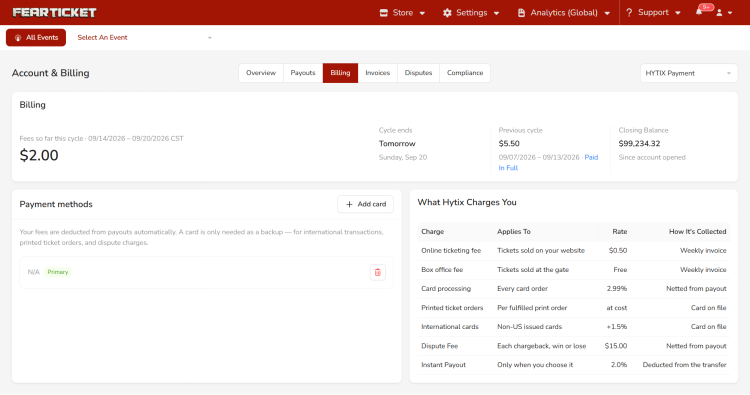
Payment Methods
Your fees are deducted from your payouts automatically. A card on file is only needed as a backup, for international transactions, printed ticket orders, and dispute charges. Use Add card to add or update it. The card marked Primary is the one that gets charged when a backup is needed.
What Hytix Charges You
This table lays out every charge, what it applies to, the rate, and how it's collected:
Charge | Applies To | Rate | How It's Collected |
Online ticketing fee | Tickets sold on your website | $0.50 | Weekly invoice |
Box office fee | Tickets sold at the gate | Free | Weekly invoice |
Card processing | Every card order | 2.99% | Netted from payout |
Printed ticket orders | Per fulfilled print order | at cost | Card on file |
International cards | Non-US issued cards | +1.5% | Card on file |
Dispute Fee | Each chargeback, win or lose | $15.00 | Netted from payout |
Instant Payout | Only when you choose it | 2.0% | Deducted from the transfer |
Online ticketing and box office fees appear on your weekly invoice. Card processing and dispute fees are netted directly from your payout, printed tickets and international card surcharges go to the card on file, and the instant payout fee is taken out of that transfer when you choose it.
Invoices
The Invoices tab is where you review and download your fee statements. FEARTICKET issues these weekly, and there's nothing to pay by hand for fees that settle automatically.
Latest Invoice and Record
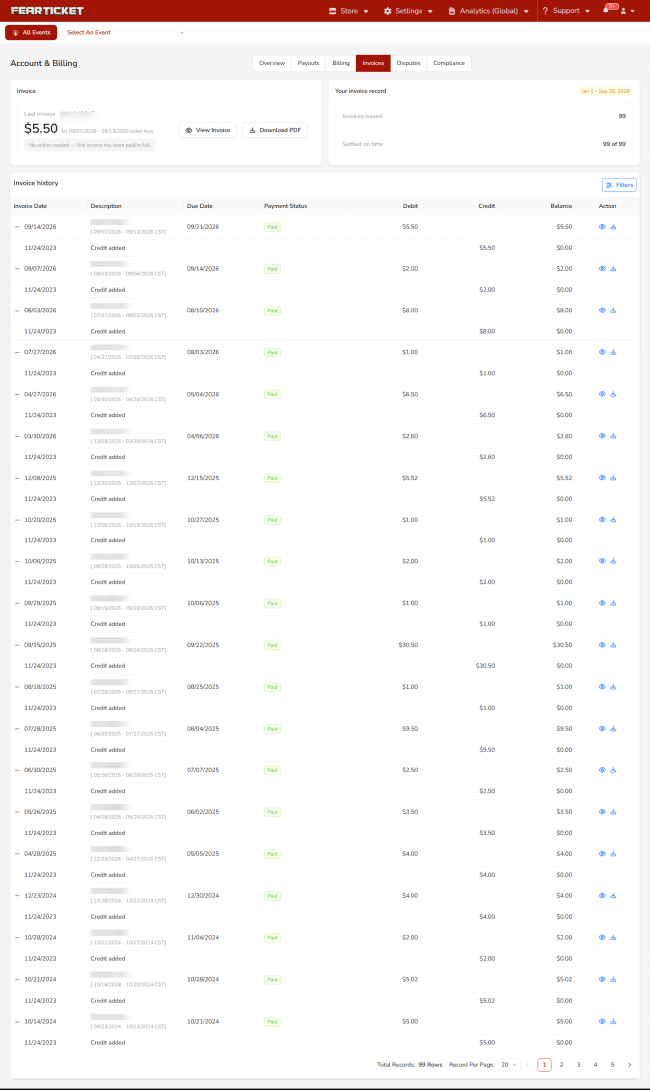
The Invoice card shows your most recent statement, its amount, and the period it covers, with View Invoice and Download PDF buttons and a note on whether any action is needed. Next to it, Your invoice record summarizes how many invoices were issued in the shown range and how many were settled on time.
Invoice History
The Invoice history table lists each invoice with its date, description, due date, payment status, debit, credit, and balance, along with any credits applied. The Action column lets you view or download an individual invoice, Filters narrows the list, and the pager at the bottom moves through longer histories.
Disputes
The Disputes tab lists any chargebacks raised against your orders. The table shows each dispute's evidence due date, customer, order number, reason, amount, whether the ticket was scanned, and its status, with Filters and Export options. When there are no disputes, it simply shows no data.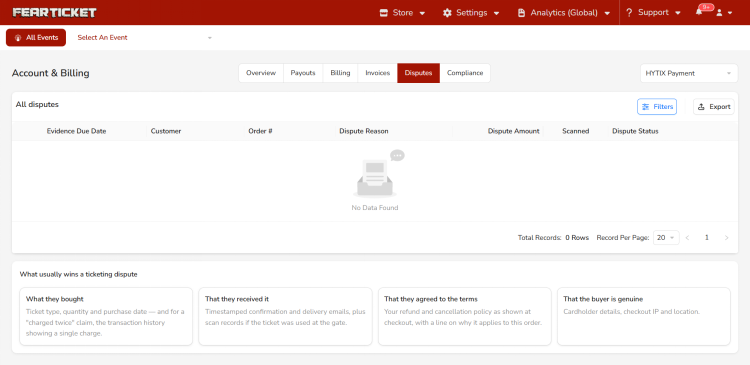
Below the table, What usually wins a ticketing dispute offers guidance on the evidence that tends to succeed: what the buyer bought, proof they received it, proof they agreed to your terms, and proof the buyer is genuine.
Compliance
The Compliance tab is where you handle the tax paperwork your payouts depend on. For U.S.-based organizers, this centers on submitting a valid IRS W-9 Form. Download the form with Download W-9 Form, fill in your business or individual details, and upload the signed copy. The name and Tax Identification Number on the form must exactly match your tax records, and incomplete or incorrect forms can delay future payouts.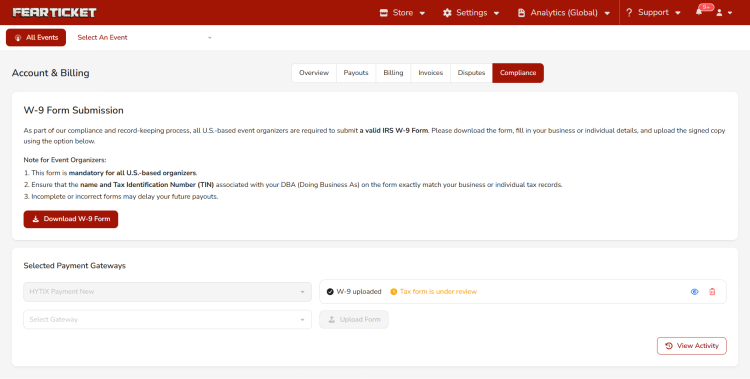
Under Selected Payment Gateways, you can see which gateway your compliance applies to and the current status of your uploaded form, such as whether the tax form is still under review. View Activity shows the history of your submissions.
Note: Compliance and payouts are linked. Payouts can be held until your tax documentation is reviewed and approved, so it's worth completing the W-9 step early to avoid any delay in receiving your money.
Was this article helpful?
That’s Great!
Thank you for your feedback
Sorry! We couldn't be helpful
Thank you for your feedback
Feedback sent
We appreciate your effort and will try to fix the article