What is a Billing Plan?
A Billing Plan in FEARTICKET defines how you are charged for selling tickets through the platform. It outlines the ticketing fees associated with your account based on the sales channel used whether tickets are sold online (through your event storefront) or at the Box Office (in-person or at the door). Your Billing Plan also determines how credit card processing fees are applied and which payment gateway handles transactions.
You can view and manage your Billing Plan by navigating to Settings → Account & Billing → Billing Plan.
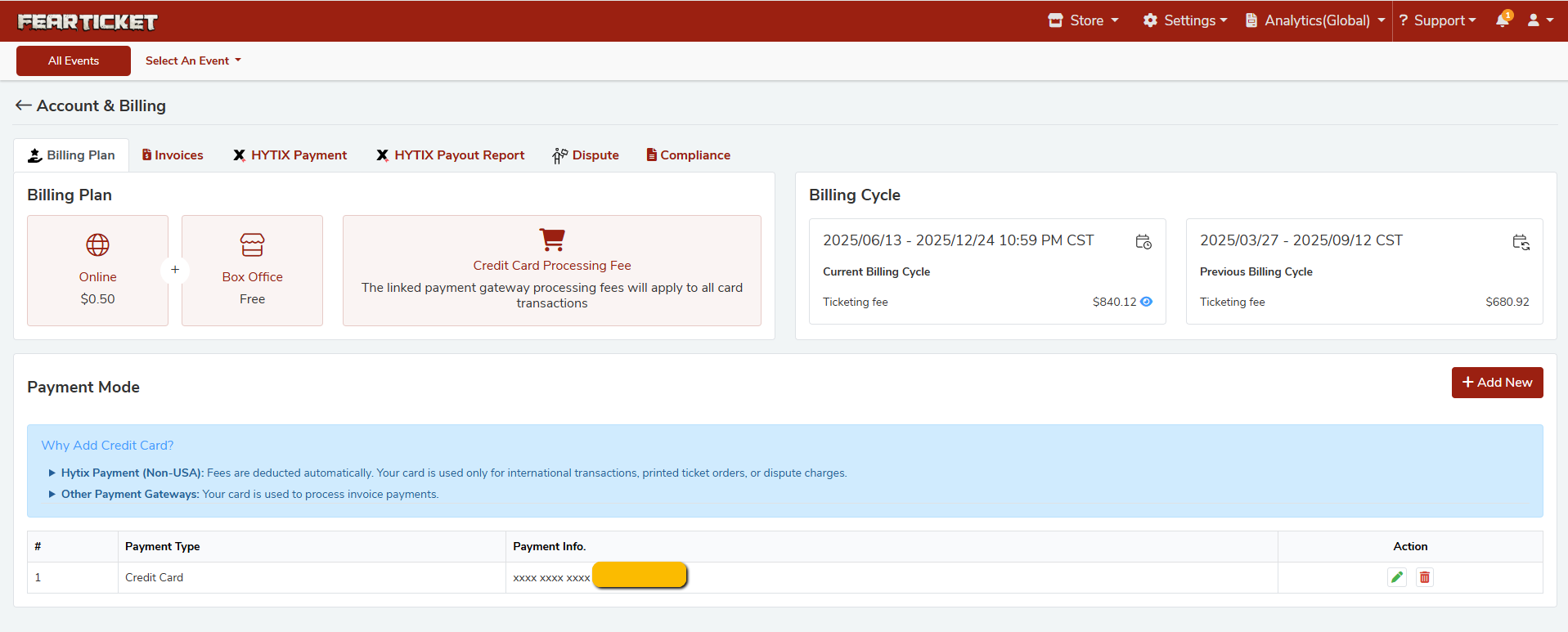
What is included in the FEARTICKET Billing Plan?
FEARTICKET offers a simple, transparent billing structure with no contracts and no hidden fees. Your billing plan consists of three components:
Component | Cost |
|---|---|
Online Ticketing | $0.50 per ticket |
Box Office | Free |
Credit Card Processing Fee | Varies by payment gateway |
Note: The $0.50 fee applies to each ticket sold online. Box Office ticket sales are always free.
What is the Online Ticketing fee?
FEARTICKET charges a flat fee of $0.50 per ticket for all online ticket sales. This is one of the lowest ticketing fees in the industry. There are no monthly subscription fees or setup costs.
Is Box Office ticketing really free?
Yes! Selling tickets through the FEARTICKET Box Office (on-site or at the door) incurs no ticketing fee. This makes it easy and cost-effective to manage walk-up sales without any added overhead.
What is the Credit Card Processing Fee?
A Credit Card Processing Fee is charged by the linked payment gateway (e.g., Hytix Payment) and applies to all card transactions. This is a standard payment gateway fee and is separate from FEARTICKET's ticketing fee.
The exact processing rate depends on your connected payment gateway.
This fee is not set by FEARTICKET it is determined by your payment provider.
Billing Cycle
What is a Billing Cycle in FEARTICKET?
A Billing Cycle is a defined date range during which your ticketing activity is tracked and invoiced. FEARTICKET generates a billing cycle summary showing the total Ticketing Fee owed for that period.
Current Billing Cycle The active period being tracked right now.
Previous Billing Cycle The most recently completed period, which has already been invoiced.
Where can I view my Billing Cycle details?
You can view your current and previous billing cycles from:
Settings → Account & Billing → Billing Plan
Each cycle displays:
Date range
Total Ticketing Fee accumulated in that period
Why does my current billing cycle show $0.00?
A $0.00 ticketing fee on the current billing cycle simply means no online tickets have been sold in the current cycle yet, or all sales were made through the free Box Office channel. Fees are only applied to online ticket sales.
Payment Mode
Why do I need to add a Credit Card to my account?
A credit card is required on your FEARTICKET account for specific payment scenarios:
Hytix Payment (Non-USA): Fees are deducted automatically. Your card is used for international transactions, printed ticket orders, or dispute charges.
Other Payment Gateways: Your card is used to process invoice payments for any outstanding balances.
Adding a credit card ensures uninterrupted service and avoids any delays in processing fees or invoices.
How do I add a Credit Card to my account?
Go to Settings → Account & Billing → Billing Plan.
Scroll down to the Payment Mode section.
Click + Add New.
Enter your credit card details and save.
Your card information is stored securely, and only the last four digits are displayed in the dashboard for reference.
How do I update or remove a saved Credit Card?
In the Payment Mode section under Account & Billing:
Click the Edit (pencil) icon next to a saved card to update the card details.
Click the Delete (trash) icon to remove a saved card from your account.
Is my credit card information secure?
Yes. FEARTICKET does not store your full card number. Only the last four digits of your card are displayed in the billing dashboard. All payment information is handled securely through your connected payment gateway.
Need help with billing? Contact the FEARTICKET support team 24/7. Our team is available to help resolve any billing questions, invoice disputes, or payment issues promptly.
Was this article helpful?
That’s Great!
Thank you for your feedback
Sorry! We couldn't be helpful
Thank you for your feedback
Feedback sent
We appreciate your effort and will try to fix the article