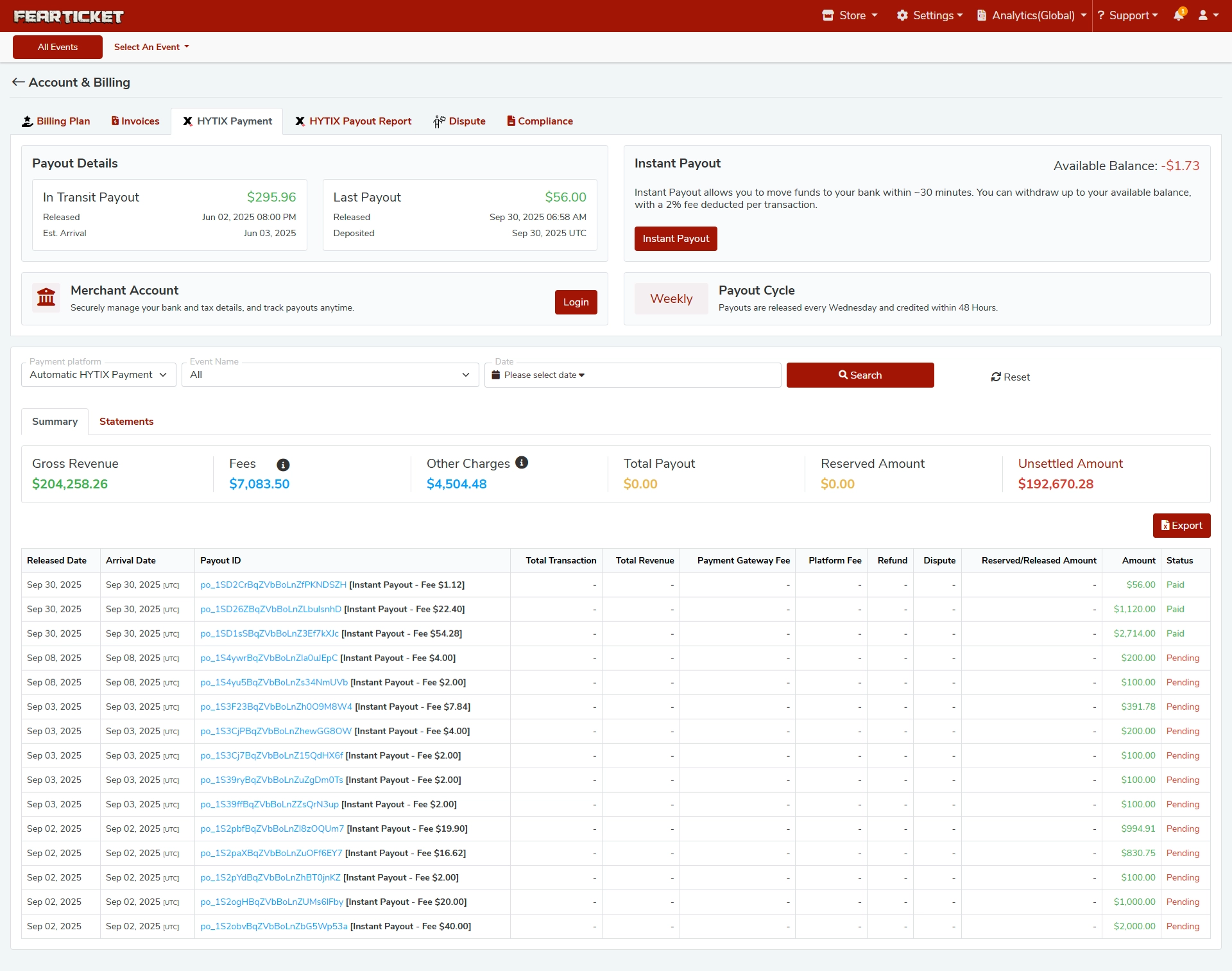
The Account & Billing section in FEARTICKET gives event organizers full visibility into their revenue, fees, payout history, and compliance. It is divided into the following tabs:
Billing Plan - View and manage your subscription or billing tier.
Invoices - Access your invoice history.
HYTIX Payment - Manage your connected payment platform and track payout details.
HYTIX Payout Report - View detailed statements of all transactions and payouts.
Dispute - Review and manage any disputed transactions.
Compliance - Access compliance-related documentation and settings.
Frequently Asked Questions
Payout Basics
Q: How often are payouts released?
Payouts are released on a weekly cycle, every Wednesday, and credited to your bank account within 48 hours.
Q: What is an "In Transit" payout?
An In Transit payout is a payment that has been released from FEARTICKET but has not yet arrived in your bank account. You can see the release date and estimated arrival date in the Payout Details section.
Example: A payout released on Jun 02, 2025 at 8:00 PM would have an estimated arrival of Jun 03, 2025.
Q: What does "Last Payout" mean?
Last Payout shows the most recent payment successfully deposited into your bank account, along with the exact release and deposit timestamps (in UTC).
Q: What is the "Reserved Amount"?
The Reserved Amount refers to funds that are temporarily held back and not yet eligible for payout. This is typically related to pending transactions, refund windows, or risk holds. Once cleared, these funds become part of your available balance.
Q: What is the "Unsettled Amount"?
The Unsettled Amount represents revenue that has been collected but has not yet been fully processed or reconciled for payout. This amount will appear in a future payout cycle once all associated transactions are settled.
Instant Payout
Q: What is Instant Payout?
Instant Payout is an optional feature that allows you to move available funds to your bank account within approximately 30 minutes, rather than waiting for the standard weekly payout cycle.
Q: Is there a fee for using Instant Payout?
Yes. A 2% fee is deducted per Instant Payout transaction.
Q: How do I use Instant Payout?
Navigate to Account & Billing > HYTIX Payment and click the Instant Payout button. The available balance will be displayed and you can withdraw up to that amount instantly.
Q: Why does my Available Balance show a negative value?
A negative available balance may occur due to refunds, chargebacks, or fee deductions that exceed current settled funds. Instant Payout cannot be initiated until the balance returns to a positive value.
HYTIX Payout Report
Q: What is the HYTIX Payout Report?
The HYTIX Payout Report is a detailed financial statement that shows all of your transactions, fees, and payout history. It includes two views:
Summary - A high-level overview of gross revenue, fees, and totals.
Statements - A line-by-line breakdown of each payout transaction.
Q: What financial metrics are shown in the Summary?
The Summary tab displays the following:
Metric | Description |
|---|---|
Gross Revenue | Total revenue collected from ticket sales |
Fees | Platform and payment processing fees deducted |
Other Charges | Additional charges such as Instant Payout fees |
Total Payout | Net amount paid out to your account |
Reserved Amount | Funds currently on hold |
Unsettled Amount | Revenue not yet processed for payout |
Q: How do I search or filter my payout statements?
Use the filter bar at the top of the Payout Report to narrow results by:
Payment Platform (e.g., Automatic HYTIX Payment)
Event Name
Date Range
Click Search to apply filters, or Reset to clear them.
Q: What does each column mean in the Statements table?
Column | Description |
|---|---|
Released Date | Date the payout was released from FEARTICKET |
Arrival Date | Date the payout is expected to arrive in your bank |
Payout ID | Unique identifier for each payout transaction |
Total Transaction | Total number of tickets or transactions in the payout |
Total Revenue | Revenue included in that payout |
Payment Gateway Fee | Fee charged by the payment processor |
Platform Fee | Fee charged by FEARTICKET |
Refund | Any refunds deducted from this payout |
Dispute | Any disputed amounts deducted |
Reserved / Released Amount | Funds reserved or released for this payout |
Amount | Final payout amount |
Status | Current status: Paid or Pending |
Q: What do the payout statuses mean?
Paid - The payout has been successfully deposited into your bank account.
Pending - The payout has been initiated but not yet deposited. This is normal for recent or in-transit payouts.
Q: Can I export my payout report?
Yes. Click the Export button at the top-right of the Statements table to download your payout data.
Merchant Account
Q: What is the Merchant Account section?
The Merchant Account section lets you securely manage your bank details, tax information, and track payouts at any time. Click Login to access your merchant dashboard.
Disputes and Compliance
Q: Where can I manage disputed transactions?
Navigate to Account & Billing > Dispute to review any transactions that have been flagged or disputed by ticket buyers. You can respond to and track the status of each dispute from this tab.
Q: Where do I find compliance documents?
The Compliance tab under Account & Billing contains all compliance-related forms, agreements, and documentation required to operate as an event organizer on FEARTICKET.
Was this article helpful?
That’s Great!
Thank you for your feedback
Sorry! We couldn't be helpful
Thank you for your feedback
Feedback sent
We appreciate your effort and will try to fix the article