What is HYTIX Payment?
HYTIX Payment is FEARTICKET's automatic payment gateway that handles ticket revenue collection and organizer payouts. It is the default payment processor for all events created on FEARTICKET.
Once enabled, HYTIX automatically:
Collects payments from ticket buyers
Holds funds in your FEARTICKET balance
Initiates payouts to your connected bank account
Note: You can view and manage your HYTIX payment settings under Account & Billing → HYTIX Payment.
Frequently Asked Questions
Q: Where can I find my HYTIX Payment settings?
A: Navigate to Account & Billing from your dashboard, then click the HYTIX Payment tab. Here you can review your payment gateway configuration and update your bank account details.
Q: What payment gateway does FEARTICKET use by default?
A: FEARTICKET uses Automatic HYTIX Payment as the default payment gateway. This is selected automatically when you set up your account and requires no manual configuration to start collecting payments.
Q: Can I switch to a different payment gateway?
A: HYTIX Payment is the primary integrated gateway in FEARTICKET. If you have questions about alternative payment configurations, please contact FEARTICKET support.
Payout Report
Q: Where can I view my payout history?
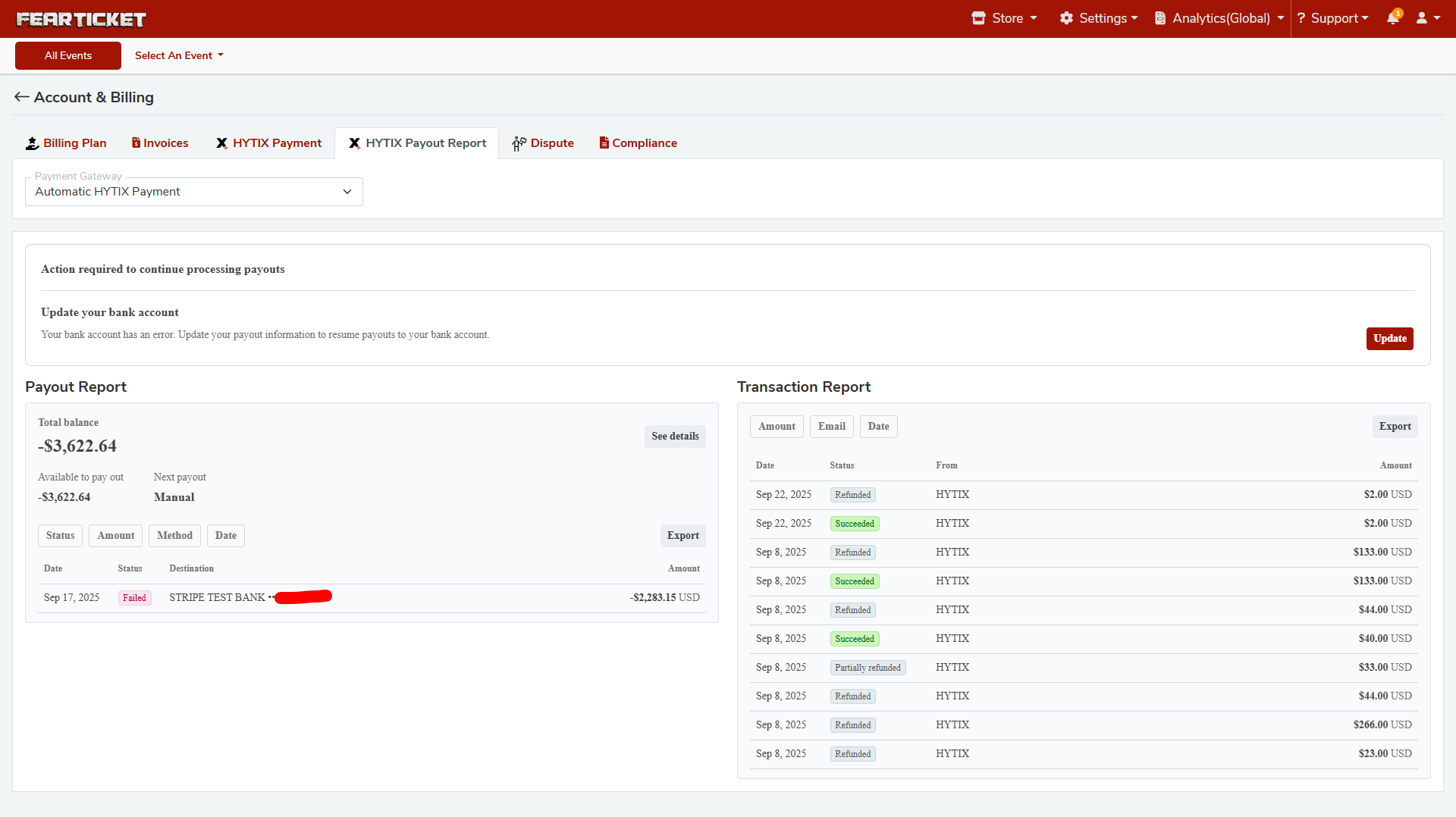
A: Go to Account & Billing → HYTIX Payout Report. This section shows:
Total Balance - The current net balance in your account
Available to Pay Out - The amount currently eligible for payout
Next Payout - Whether the next payout is automatic or manual
Payout History - A detailed list of past payouts with date, status, destination, and amount
Q: What does a negative total balance mean?
A: A negative total balance (e.g., -$3,622.64) typically indicates that refunds issued to buyers have exceeded the revenue collected, or that a payout previously sent to your bank account was reversed or failed. Review your Transaction Report to identify refunded transactions contributing to the negative balance.
Q: What does "Next Payout: Manual" mean?
A: When the next payout is set to Manual, funds will not be automatically transferred to your bank account. This can occur when:
Your bank account has an error or is unverified
A previous payout failed
Payouts have been paused pending account review
To resume automatic payouts, update your bank account information under HYTIX Payment.
Q: Can I export my payout report?
A: Yes. In the Payout Report section, click the Export button to download a copy of your payout history. You can also filter by Status, Amount, Method, and Date before exporting.
Transaction Report
Q: What is the Transaction Report?
A: The Transaction Report (found on the right side of the HYTIX Payout Report page) shows all individual payment transactions tied to your account. Each entry displays:
Date of the transaction
Status (Succeeded, Refunded, Partially Refunded)
Source (e.g., HYTIX)
Amount in USD
Q: What do the different transaction statuses mean?
Status | Meaning |
|---|---|
Succeeded | Payment was successfully collected from the buyer |
Refunded | The full transaction amount was refunded to the buyer |
Partially Refunded | Only a portion of the transaction was refunded |
Failed | The payout or payment attempt was unsuccessful |
Q: Can I filter the Transaction Report by email or date?
A: Yes. Use the Amount, Email, and Date tabs at the top of the Transaction Report to filter and view transactions by specific criteria.
Q: Can I export the Transaction Report?
A: Yes. Click the Export button at the top-right of the Transaction Report panel to download the data.
Bank Account & Errors
Q: I see a message saying "Action required to continue processing payouts" - what should I do?
A: This alert appears when your connected bank account has an error, which prevents FEARTICKET from sending payouts. To resolve this:
Go to Account & Billing → HYTIX Payment
Click the Update button next to the bank account error message
Re-enter or verify your bank account and routing information
Save your changes
Once your bank account is updated and verified, payouts will resume automatically.
Q: My payout shows a "Failed" status. What happened?
A: A Failed payout means the transfer to your bank account was unsuccessful. Common reasons include:
Incorrect bank account or routing number
Bank account closed or frozen
Verification pending
Update your bank account details under HYTIX Payment and contact support if the issue persists.
Q: How long does it take to receive a payout after my bank account is updated?
A: After updating your bank account information, payouts are typically processed within 2 to 5 business days, depending on your bank. The Next Payout field in your Payout Report will update to reflect the scheduled transfer once the account is verified.
Disputes & Compliance
Q: Where can I manage payment disputes?
A: Navigate to Account & Billing → Dispute to view and respond to any payment disputes raised by ticket buyers.
Q: Where can I find compliance-related documents?
A: Compliance documents and agreements are available under Account & Billing → Compliance.
Was this article helpful?
That’s Great!
Thank you for your feedback
Sorry! We couldn't be helpful
Thank you for your feedback
Feedback sent
We appreciate your effort and will try to fix the article