What Is a Dispute?
A dispute (also called a chargeback) occurs when a ticket buyer contacts their bank or credit card provider to challenge a charge made through FEARTICKET. The bank then initiates a formal dispute process, temporarily reversing the funds while the case is reviewed.
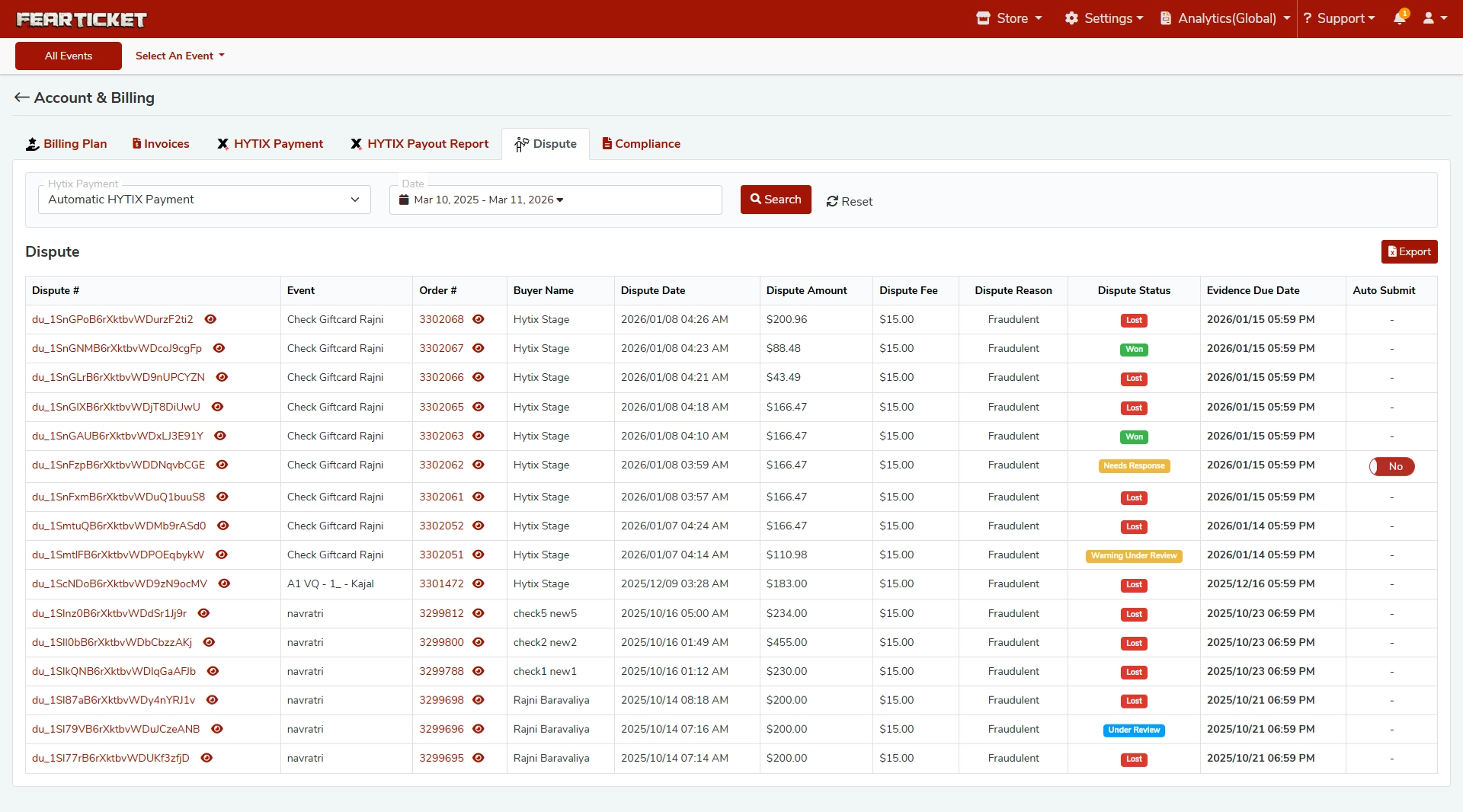
Disputes are tracked and managed directly inside FEARTICKET under Account & Billing > Dispute.
How Do I Access the Dispute Dashboard?
Log in to your FEARTICKET organizer account.
Navigate to Account & Billing from the top menu.
Click on the Dispute tab.
From here, you can filter disputes by:
Hytix Payment Type (e.g., Automatic HYTIX Payment)
Date Range (e.g., Mar 10, 2025 to Mar 11, 2026)
Click Search to load results, or Reset to clear filters. You can also Export the dispute list using the Export button in the top-right corner of the table.
What Information Is Shown in the Dispute Table?
Each dispute record displays the following columns:
Column | Description |
|---|---|
Dispute # | A unique identifier for the dispute (e.g., |
Event | The name of the event the disputed ticket was purchased for |
Order # | The original order number associated with the purchase |
Buyer Name | The name of the ticket buyer who filed the dispute |
Dispute Date | The date and time the dispute was filed |
Dispute Amount | The dollar amount being disputed |
Dispute Fee | A flat fee of $15.00 charged per dispute |
Dispute Reason | The reason provided by the buyer's bank (e.g., Fraudulent) |
Dispute Status | Current status of the dispute (see below) |
Evidence Due Date | Deadline to submit supporting evidence to contest the dispute |
Auto Submit | Indicates whether evidence will be automatically submitted |
What Are the Different Dispute Statuses?
Each dispute moves through one or more of the following statuses:
Lost - The dispute was decided in the buyer's favor. The funds have been returned to the buyer and the $15.00 dispute fee has been charged.
Won - The dispute was resolved in your favor. The funds have been returned to your account.
Needs Response - Action required! You must submit evidence before the Evidence Due Date to contest this dispute. Failure to respond may result in an automatic loss.
Warning Under Review - The dispute has been flagged and is currently being evaluated. No immediate action is required, but monitor closely.
Under Review - Evidence has been submitted and the dispute is currently being reviewed by the bank or card network.
What Is the Dispute Fee?
FEARTICKET charges a flat $15.00 dispute fee for every dispute filed against your account, regardless of the outcome. This fee is charged by the payment processor (Hytix) and is non-refundable, even if you win the dispute.
Tip: The best way to avoid dispute fees is to prevent chargebacks proactively. See the prevention tips below.
What Does "Fraudulent" Mean as a Dispute Reason?
Fraudulent is the most common dispute reason and means the buyer is claiming they did not authorize the transaction. This can happen when:
The buyer's card was used without their knowledge.
The buyer does not recognize the charge on their statement.
In some cases, the buyer may be attempting to obtain a refund dishonestly (friendly fraud).
Other possible dispute reasons include:
Product/Service Not Received - The buyer claims they did not receive what they paid for.
Product Unacceptable - The buyer claims the event/experience did not match the description.
Subscription Canceled - The buyer claims they canceled before being charged.
How Do I Respond to a Dispute?
If a dispute shows the status Needs Response, follow these steps:
Open the dispute record from the Dispute dashboard.
Review the Evidence Due Date - this is your deadline.
Gather supporting evidence, such as:
Proof of purchase / order confirmation
Ticket delivery confirmation (email logs)
Event check-in records showing the buyer attended
Your refund policy (clearly stated at checkout)
Any communication with the buyer
Submit your evidence before the deadline.
Important: Missing the Evidence Due Date will likely result in an automatic loss. Act quickly when a dispute shows "Needs Response."
What Is "Auto Submit" for Evidence?
The Auto Submit column indicates whether FEARTICKET will automatically submit a standard evidence package on your behalf when a dispute is filed.
If set to Yes - FEARTICKET will auto-submit basic evidence (e.g., order details, ticket delivery records) before the deadline.
If set to No (or blank) - You must manually submit evidence yourself.
Contact FEARTICKET support if you would like to enable Auto Submit for your account.
Can I Export the Dispute List?
Yes. Click the Export button (top-right corner of the Dispute table) to download a CSV or report of all dispute records based on your current filter selection. This is useful for accounting, reconciliation, or sharing data with your team.
How Can I Prevent Disputes?
Here are best practices to reduce the likelihood of disputes:
Use a recognizable billing descriptor - Make sure your business name appears clearly on buyer bank statements.
Display your refund policy prominently at checkout so buyers know the terms before purchasing.
Send order confirmation emails immediately after purchase with clear event details.
Respond quickly to buyer inquiries - Many disputes are filed when buyers cannot reach the organizer.
Keep check-in records to prove attendance in case of a dispute.
Avoid last-minute event cancellations - Always communicate changes to buyers proactively.
Issue refunds promptly when appropriate, rather than letting buyers escalate to their bank.
Need Help with a Dispute?
FEARTICKET's support team is available 24/7 to help you navigate disputes, gather evidence, and protect your revenue.
Was this article helpful?
That’s Great!
Thank you for your feedback
Sorry! We couldn't be helpful
Thank you for your feedback
Feedback sent
We appreciate your effort and will try to fix the article