Complimentary Tickets allow event organizers to issue free tickets for marketing campaigns, promotional activities, manual orders, or giveaways. All complimentary orders are processed as $0.00 value in the system and count toward your FEARTICKET ticket balance.
What Are Complimentary Tickets?
Complimentary Tickets are free tickets generated directly by the event organizer. No payment is required from the recipient. They are ideal for:
Marketing campaigns: Reward loyal customers or promote your event.
Promotional activities: Partner giveaways, influencer passes, or press tickets.
Manual orders: Accommodate special guests, VIPs, or staff.
Giveaways: Contest winners or raffle prizes.
Complimentary Tickets count toward your overall FEARTICKET ticket balance and are processed as $0.00 in the system.
Frequently Asked Questions
How do I generate a Complimentary Ticket?
Navigate to Tickets & Pricing in your Event Dashboard.
Click on Complimentary Tickets in the left sidebar.
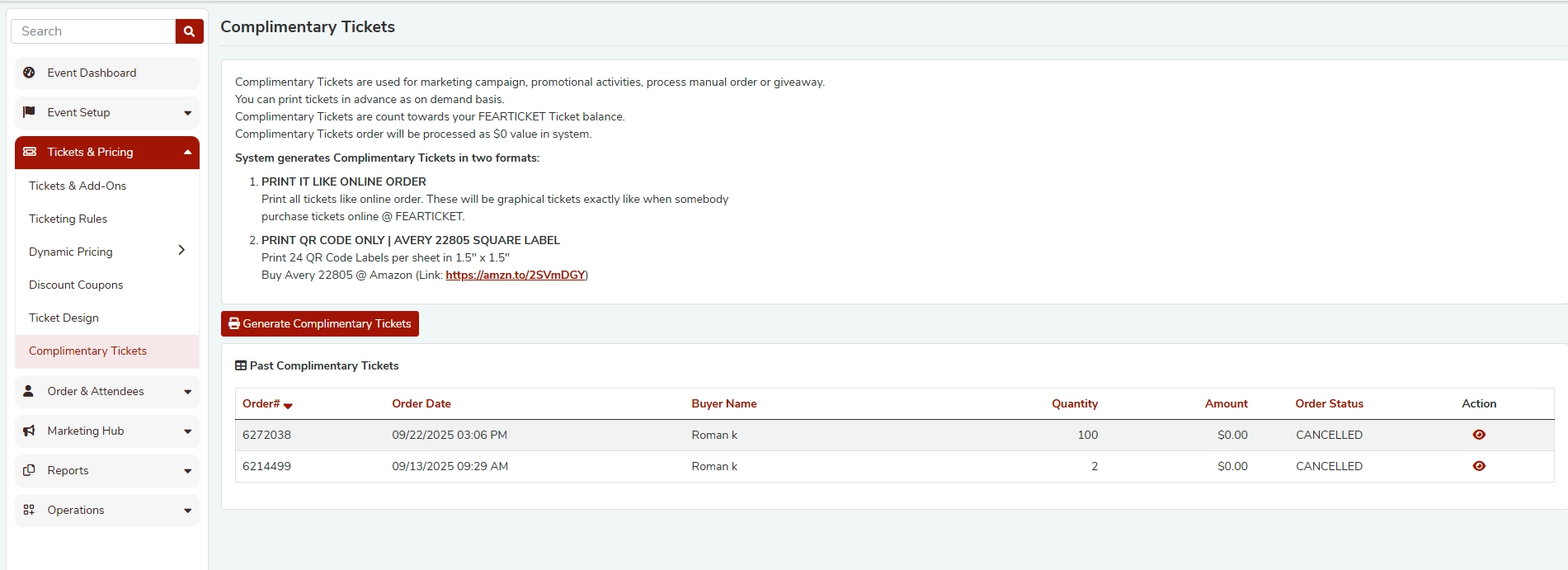
Click the Generate Complimentary Tickets button.
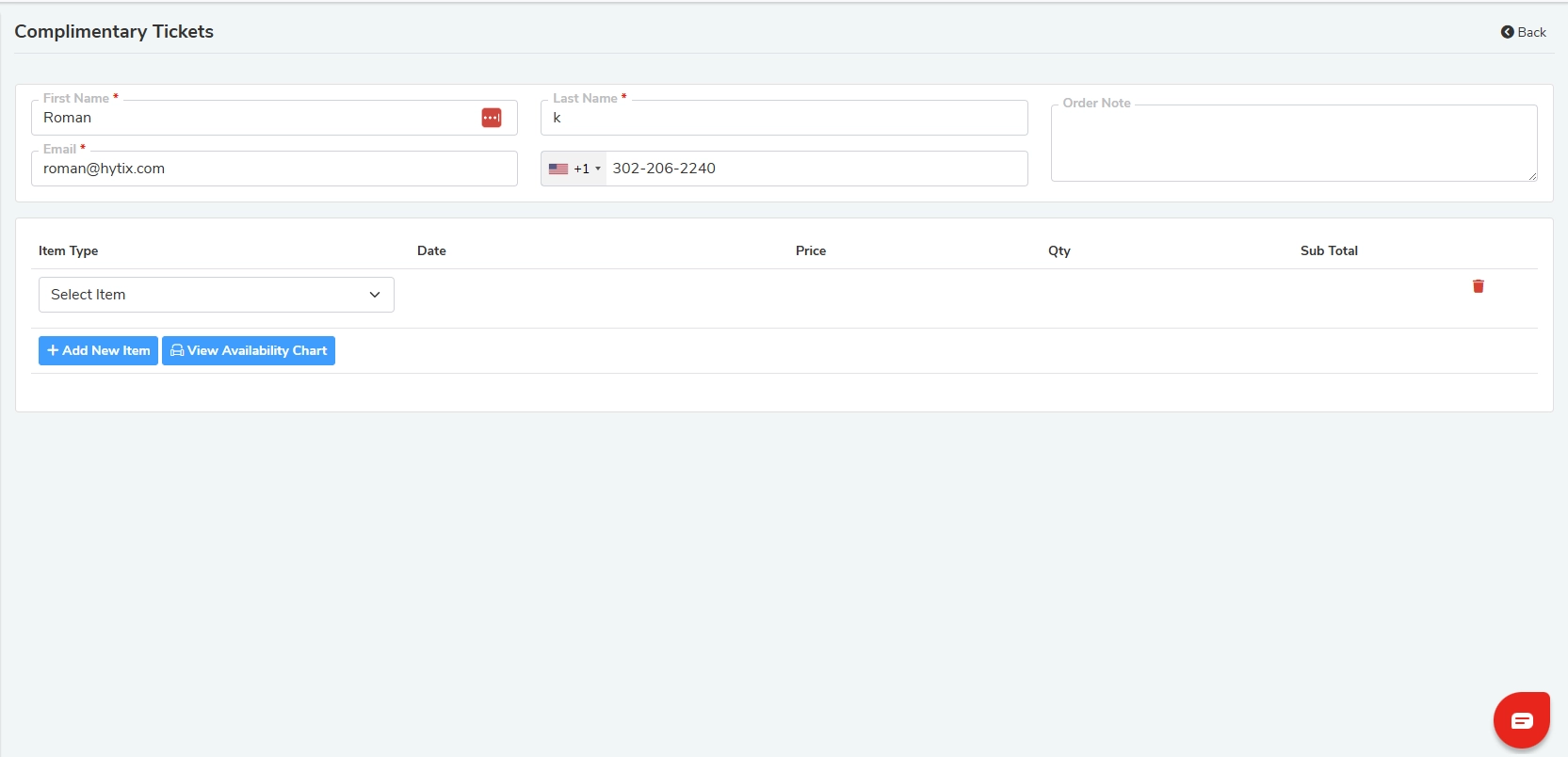
Fill in the recipient's details:
First Name (required)
Last Name (required)
Email (required)
Phone Number (optional)
Order Note (optional)
Under the item table, click + Add New Item to select a ticket type.
Choose the Item Type (e.g., GA), Date/Time slot, and Quantity.
Select your preferred print format and click Create Order or Create Order & Notify.
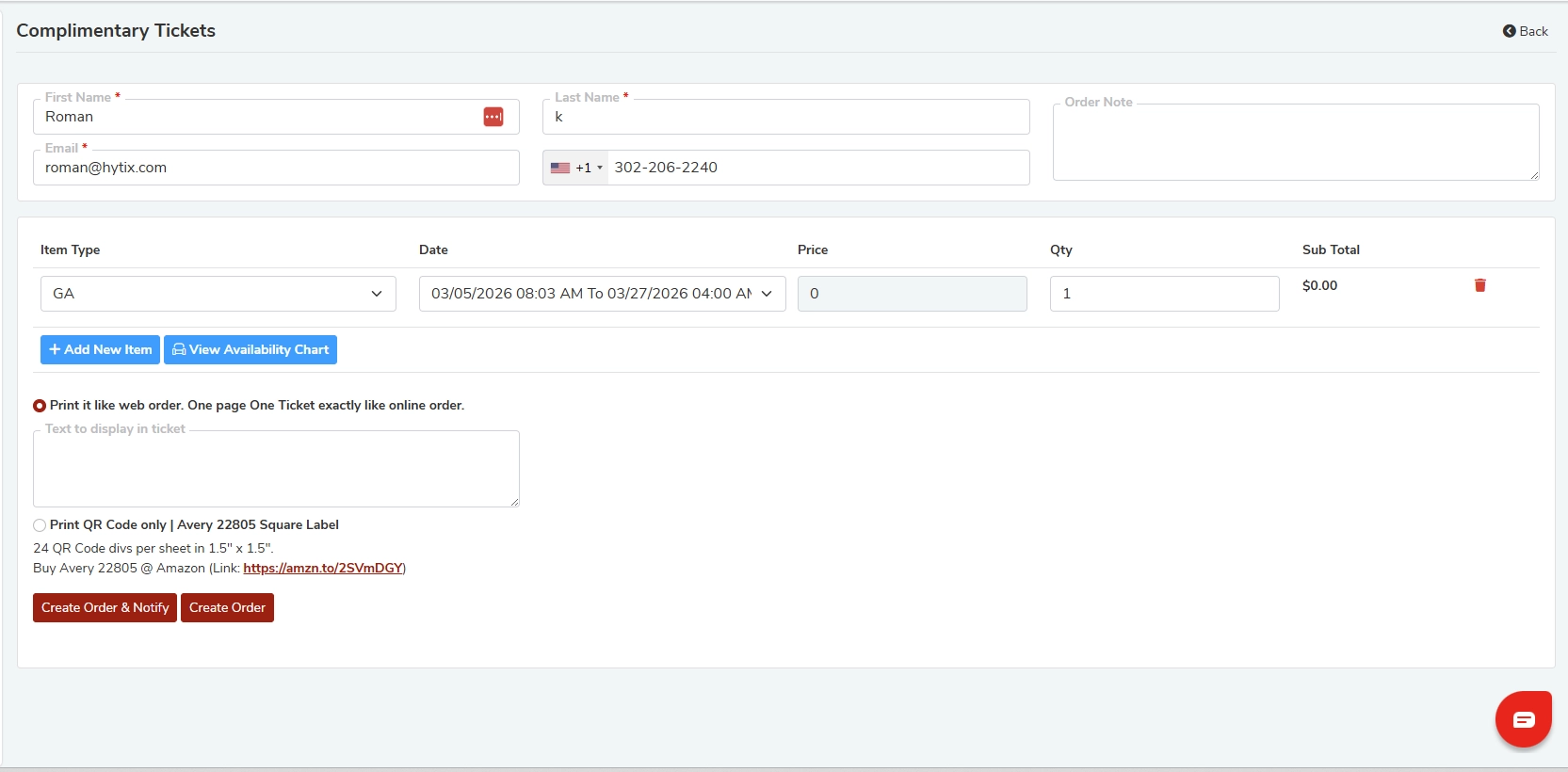
What information is required to create a Complimentary Ticket order?
The following fields are required:
Field | Required? |
|---|---|
First Name | Yes |
Last Name | Yes |
Yes | |
Phone Number | Optional |
Order Note | Optional |
Item Type (ticket type) | Yes |
Date / Time Slot | Yes |
Quantity | Yes |
What ticket types can I select for a Complimentary Ticket?
You can select any active ticket type configured for your event (e.g., General Admission, VIP, etc.) from the Item Type dropdown. Use the View Availability Chart button to check remaining capacity before issuing tickets.
What are the print format options?
FEARTICKET generates Complimentary Tickets in two formats:
Print It Like Online Order
Prints tickets exactly like a standard online order.
One full-page graphical ticket per order, identical to what a buyer receives when purchasing online.
Print QR Code Only - Avery 22805 Square Label
Prints 24 QR Code labels per sheet at 1.5" × 1.5".
Compatible with Avery 22805 label sheets.
Purchase labels on Amazon: https://amzn.to/2SVmDGY
What is the difference between "Create Order" and "Create Order & Notify"?
Action | What It Does |
|---|---|
Create Order | Creates the complimentary ticket order without sending any email to the recipient. |
Create Order & Notify | Creates the order and automatically sends a confirmation/ticket email to the recipient's email address. |
Use Create Order & Notify when you want the recipient to receive their ticket directly via email.
Can I add multiple ticket types in a single Complimentary Ticket order?
Yes. Use the + Add New Item button to add multiple line items within the same order. Each line item can have a different ticket type, date/time slot, and quantity.
Can I add a custom message to the ticket?
Yes. After selecting your item type, a "Text to display in ticket" field appears below the print format options. Enter any custom message you'd like printed on the ticket.
Where can I view past Complimentary Ticket orders?
All previously generated complimentary orders are listed in the Past Complimentary Tickets table at the bottom of the Complimentary Tickets page. The table includes:
Order #
Order Date
Buyer Name
Quantity
Amount (always $0.00)
Order Status (e.g., Active, Cancelled)
Action (cancel or delete option)
Can a Complimentary Ticket order be cancelled?
Yes. From the Past Complimentary Tickets table, use the action icon on the right side of any order to cancel it. Cancelled orders will show a CANCELLED status in the table.
Do Complimentary Tickets affect my event's ticket inventory?
Yes. Complimentary Tickets count toward your FEARTICKET ticket balance and reduce available capacity for the selected time slot. Always check the View Availability Chart before issuing large quantities.
Is there a cost to issue Complimentary Tickets?
Complimentary Ticket orders are processed at $0.00 in the system. However, they do count toward your FEARTICKET ticket balance, so standard per-ticket platform fees may apply based on your pricing plan.
Best Practices
Always use Create Order & Notify for giveaway winners so they receive their tickets instantly.
Use Order Notes to record why the complimentary ticket was issued (e.g., "Press Pass - Halloween Weekly").
Check the Availability Chart before generating large batches to avoid overselling.
Use the QR Code Label format for wristband-style printing at the box office.
Review the Past Complimentary Tickets table regularly to track issued passes and cancel any errors promptly.
Was this article helpful?
That’s Great!
Thank you for your feedback
Sorry! We couldn't be helpful
Thank you for your feedback
Feedback sent
We appreciate your effort and will try to fix the article