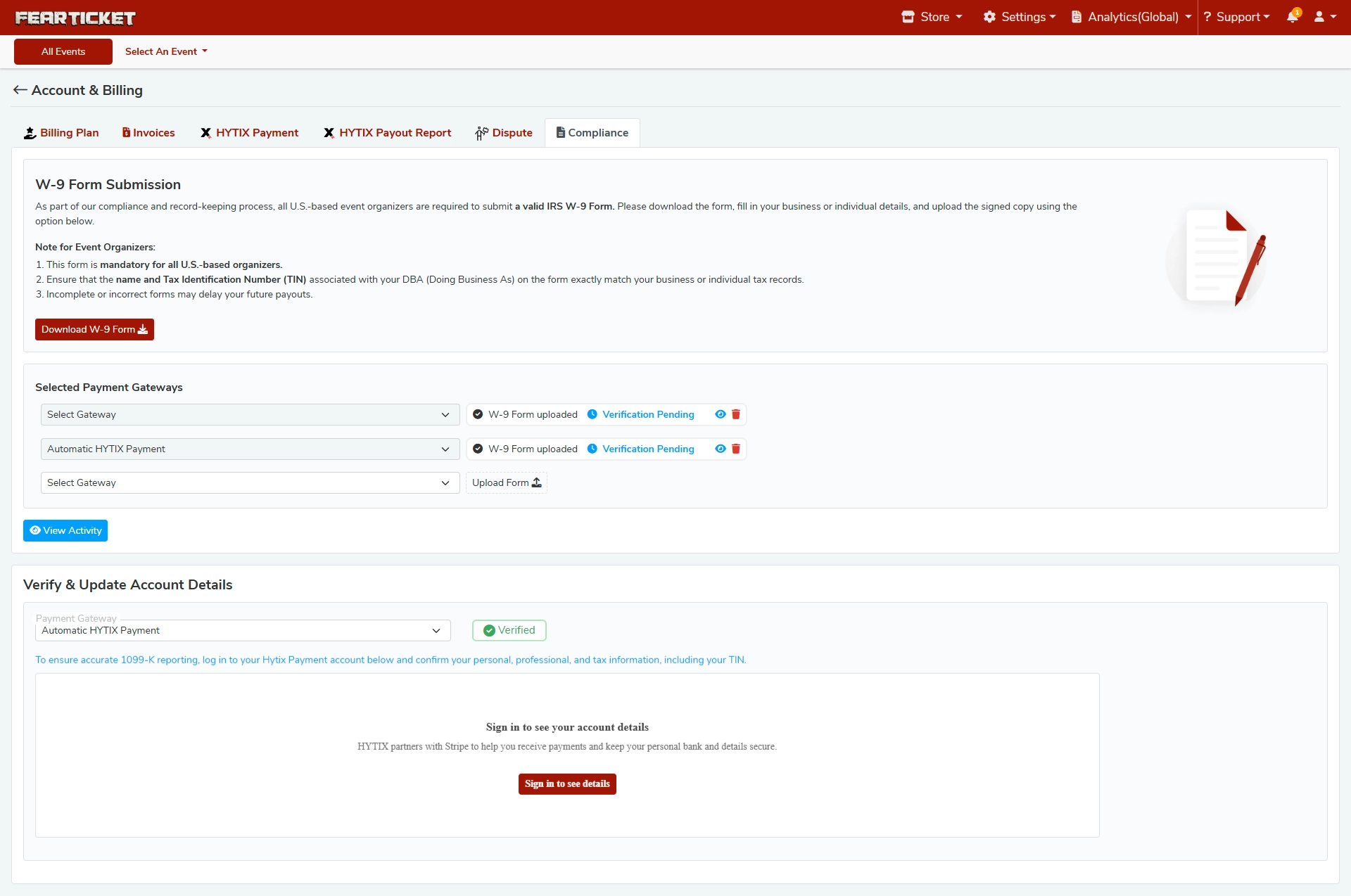
W-9 Form Submission
What is the W-9 Form requirement on FEARTICKET?
As part of FEARTICKET's compliance and record-keeping process, all U.S.-based event organizers are required to submit a valid IRS W-9 Form. This ensures accurate tax reporting and helps avoid delays in payouts.
Why do I need to submit a W-9 Form?
The W-9 Form is used for 1099-K tax reporting purposes. FEARTICKET is required by law to collect this information from U.S.-based organizers who receive payments through the platform.
How do I submit my W-9 Form?
Go to Account & Billing → Compliance tab.
Click the "Download W-9 Form" button to get the official IRS form.
Fill in your business or individual details.
Upload the signed copy directly from the Compliance page.
What information do I need to fill in on the W-9 Form?
Your legal name or DBA (Doing Business As) name — this must exactly match your business or individual tax records.
Your Tax Identification Number (TIN) — this must also exactly match what is on file with the IRS.
Important: Incomplete or incorrect forms may delay your future payouts.
Is the W-9 Form mandatory?
Yes. The W-9 Form is mandatory for all U.S.-based organizers. Non-compliance may result in held or delayed payments.
Payment Gateways & W-9 Verification
What are "Selected Payment Gateways" in the Compliance section?
This section shows the payment gateways linked to your FEARTICKET account. For each gateway, you can see:
Whether a W-9 Form has been uploaded
The verification status of that form (e.g., Verification Pending or Verified)
What does "Verification Pending" mean?
Verification Pending means your W-9 Form has been uploaded successfully but is currently being reviewed by the FEARTICKET compliance team. No action is needed on your end unless you are contacted for corrections.
What does "Verified" mean next to a payment gateway?
Verified means your W-9 Form and account details have been reviewed and approved for that payment gateway. You are fully compliant and eligible for payouts through that gateway.
What is "Automatic HYTIX Payment"?
Automatic HYTIX Payment is FEARTICKET's built-in payment gateway powered by HYTIX, which integrates with Stripe to securely handle your payouts and keep your bank and personal details protected.
Verify & Update Account Details
How do I verify my account details for accurate 1099-K reporting?
Navigate to Account & Billing → Compliance.
Under "Verify & Update Account Details", select your Payment Gateway (e.g., Automatic HYTIX Payment).
Click "Sign in to see details" to log into your HYTIX Payment account.
Confirm your personal, professional, and tax information, including your TIN.
Why does FEARTICKET use Stripe for payment details?
FEARTICKET partners with HYTIX, which uses Stripe as its secure payment infrastructure. Stripe ensures your bank account and personal details are kept private and secure.
What should I do if my account shows "Verification Pending" for a long time?
If your W-9 verification has been pending for an extended period:
Double-check that your form was filled out correctly (matching name and TIN).
Contact FEARTICKET Support via the Support menu at the top of your dashboard.
You can also click "View Activity" on the Compliance page to track the status of your submission.
How do I view past compliance activity?
Click the "View Activity" button on the Compliance page to see a log of your W-9 uploads and verification history.
Pro Tip: Submit your W-9 Form as early as possible before your event goes live to avoid any payout delays during or after your event.
Was this article helpful?
That’s Great!
Thank you for your feedback
Sorry! We couldn't be helpful
Thank you for your feedback
Feedback sent
We appreciate your effort and will try to fix the article