Billing Plan: Understanding Your Pricing Structure
The Billing Plan page shows exactly how your ticketing fees are calculated. It explains what you pay for online sales, box office sales, and how your billing cycles work. This helps you understand the cost side of your ticketing revenue.
How to Access Billing Plan
- Log in to your FEARTICKET account.
- Click Account & Billing in the top navigation.
- Click the Billing Plan tab.

Pricing Structure
You will see three main items that define your pricing:
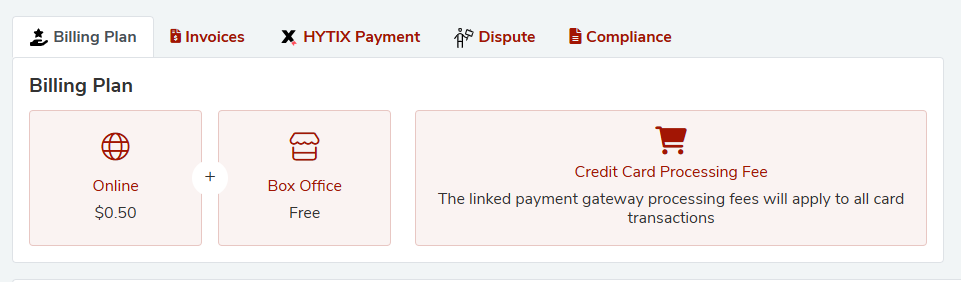
A. Online Ticket Sales Fee
- Example fee: $0.50 per ticket
- This fee is charged each time a customer buys a ticket online through your FEARTICKET event page.
Example:
- If you sell 100 tickets online in a week:
- Fee = 100 x $0.50 = $50.00
When it is charged:
- Fees accumulate during the billing cycle (for example every 7 to 14 days)
- At the end of the cycle, fees are billed in an invoice.
B. Box Office Ticket Sales Fee
- Fee: Free
- When you sell tickets at the box office (in person, manually through FEARTICKET’s box office), there is no FEARTICKET ticketing fee.
Benefit:
- Box office sales are a cost effective option for walk in guests, since no per ticket platform fee is charged.
C. Credit Card Processing Fee
- FEARTICKET uses a payment gateway to securely process credit and debit card payments.
- The gateway charges processing fees on all card payments.
- These can apply to both online and box office card transactions.
These processing fees are standard in the ticketing and payments industry and cover the cost of using banks and card networks.
Billing Cycle Information
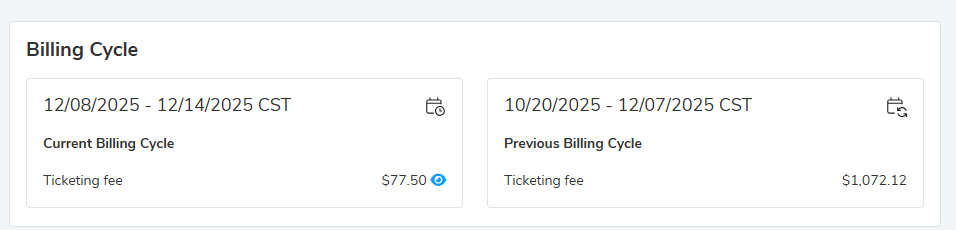
On the right side, you will see the Billing Cycle box which explains your current and previous cycles.
Current Billing Cycle
- Shows the date range of the current billing period, for example:
- 12/08/2025 to 12/14/2025 CST
- Shows the Ticketing Fee total for this period, for example $0.00 if there have been no online ticket sales yet.
This helps you monitor how much fee is building up in the current cycle.
Previous Billing Cycle
- Shows the date range of your last billing cycle.
- Shows the Ticketing Fee for that completed cycle, for example $1,072.12
You can compare current and previous cycles to see if your sales and fees are increasing or decreasing.
Key points about billing cycles:
- Typically run for 7 to 14 days, depending on your account.
- Online ticket fees accumulate during the cycle.
- At the end of the cycle, an invoice is generated and appears in the Invoices tab.
Payment Mode
The Payment Mode section lets you add and manage payment methods that FEARTICKET uses to charge your fees and invoices.
You will see a heading Payment Mode and a red + Add New button.
Why add a payment method
- Hytix Payment (Non U.S. organizers)
- For some non U.S. accounts, certain fees can be charged directly to a card added here.
- This can include international payment related fees, printed ticket order fees or dispute adjustments.
- Invoice and platform fee payments
- FEARTICKET can use your saved card to automatically process invoices and platform fees.
- This avoids interruptions if an invoice remains unpaid.
How to add a payment method
- Click + Add New.
- Choose a payment type (for example Credit Card).
- Enter the card or bank details.
- Save the payment method.
Payment Method Table
The table shows:
- No.: Numbered order of methods.
- Payment Type: For example Credit Card, Bank Account, Offline.
- Payment Info: Masked details like the last 4 digits of the card.
- Action: Edit or delete options.
Security note:
Your payment information is stored securely. Full card numbers are not shown and are encrypted.

Tips
- Regularly check your Billing Cycle and Fees so there are no surprises.
- Use Invoices page to verify exact charges for each period.
- If you are a non U.S. organizer, confirm with support how Hytix Payment fees are applied.
Was this article helpful?
That’s Great!
Thank you for your feedback
Sorry! We couldn't be helpful
Thank you for your feedback
Feedback sent
We appreciate your effort and will try to fix the article