Click here for help on > View Order Report before going into order detail.
Now, Let us see order details
On order reports page, once clicking on "View Order"
This will open the Order Details page as shown in the image below.
From the Order Details page, you can view full order information and perform actions such as resending tickets, printing tickets, editing order details, or cancelling/refunding the order.
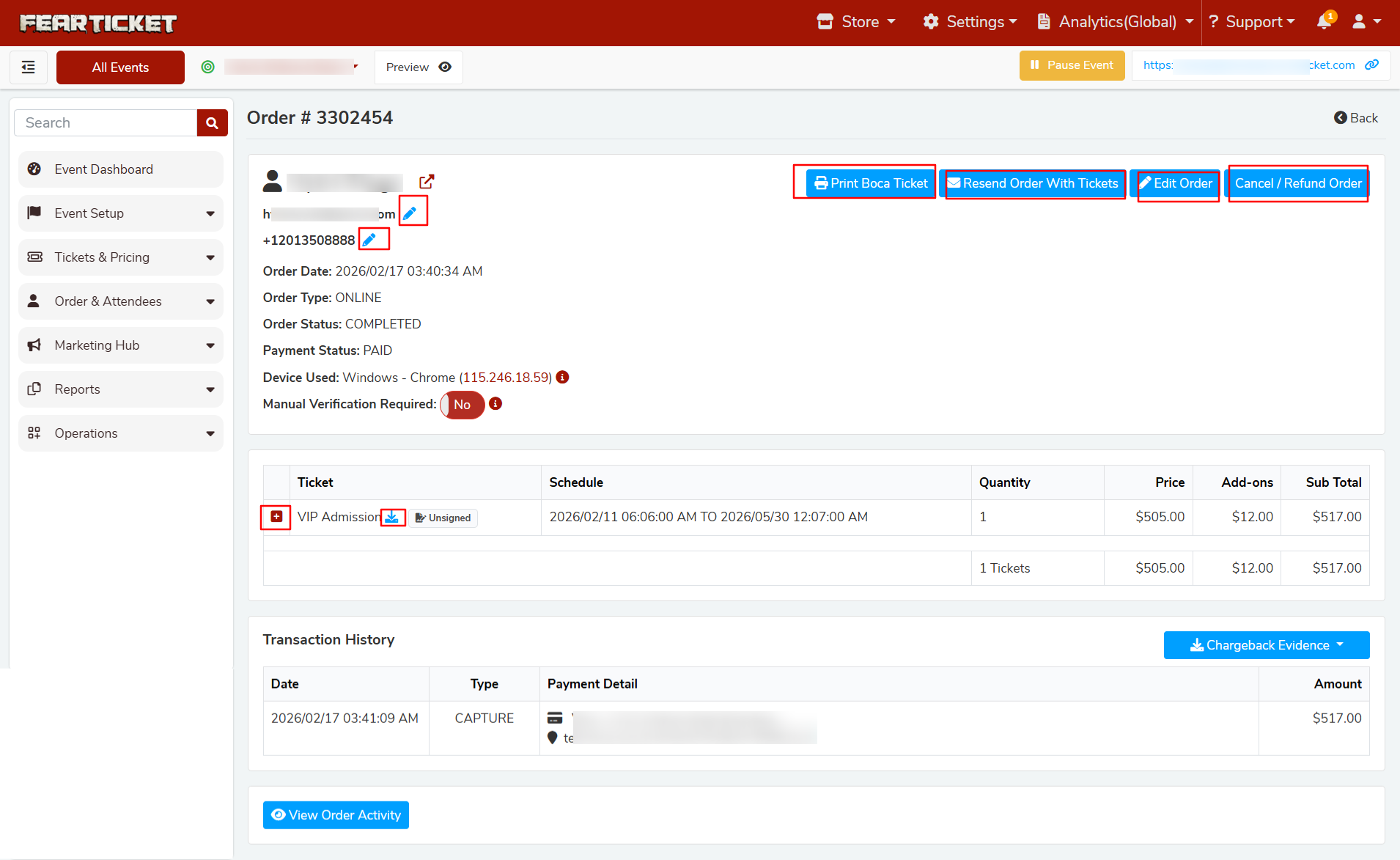
Available Actions on Order Details Page
The following options are available on the top right of the Order Details page:
- Print BOCA Ticket – Print tickets using a BOCA printer (used for box office ticket printing).
- Resend Order With Tickets – Resend the order confirmation email along with the tickets to the buyer.
- Edit Order – Modify order details if necessary.
- Cancel / Refund Order – Cancel the order and process a refund if required.
- Edit Buyer Email ID – Click the edit icon next to the buyer's email to correct or update the email address before resending the order email.
- Download Ticket PDF – Download the ticket file as a PDF.
- View Ticket Information – Click the "+" icon to expand and view detailed ticket information.
- Back – Return to the Orders report page.
Transaction History
The Transaction History section displays payment activity for the order, including:
- Transaction date
- Payment type
- Payment details
- Amount paid
Tips: Using the Edit Email ID option is helpful when a buyer did not receive the tickets due to an incorrect email address. After updating the email address, use Resend Order With Tickets to send the tickets again.
Cancel / Refund:
To cancel or refund an order, click the Cancel / Refund Order button located at the top right of the Order Details page.
Click here for detailed help for > Order Cancellation and Refund
Was this article helpful?
That’s Great!
Thank you for your feedback
Sorry! We couldn't be helpful
Thank you for your feedback
Feedback sent
We appreciate your effort and will try to fix the article