Self Insurance is an optional add-on that event organizers can configure to offer buyers protection on their ticket purchase. When enabled, buyers are prompted at checkout to accept or decline the insurance. If a buyer requests a refund covered under the insurance, the organizer is responsible for processing it - FEARTICKET is not involved in the refund.
This feature gives organizers full control over their own insurance policy terms, pricing, and refund handling.
Frequently Asked Questions
General
Q: Where do I find Self Insurance in FEARTICKET?
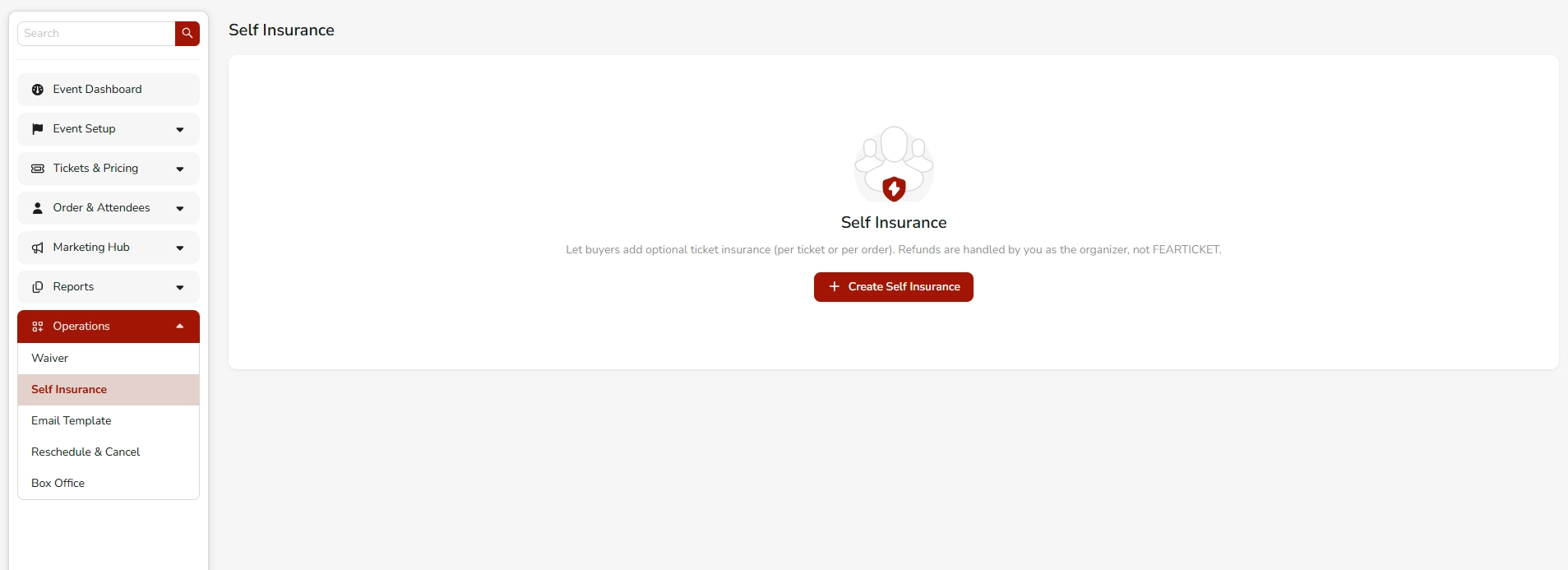
A: Go to your Event Dashboard - Operations - Self Insurance. If no insurance has been created yet, you'll see an empty state with a + Create Self Insurance button.
Q: Who handles refunds under Self Insurance?
A: The event organizer handles all refunds. FEARTICKET is not responsible for processing or approving any insurance-related refund claims.
Q: Can I create more than one Self Insurance policy per event?
A: You can create a Self Insurance configuration per event. Navigate to Operations - Self Insurance and click + Create Self Insurance to get started.
Setting Up Self Insurance
Q: What information do I need to fill in when creating Self Insurance?
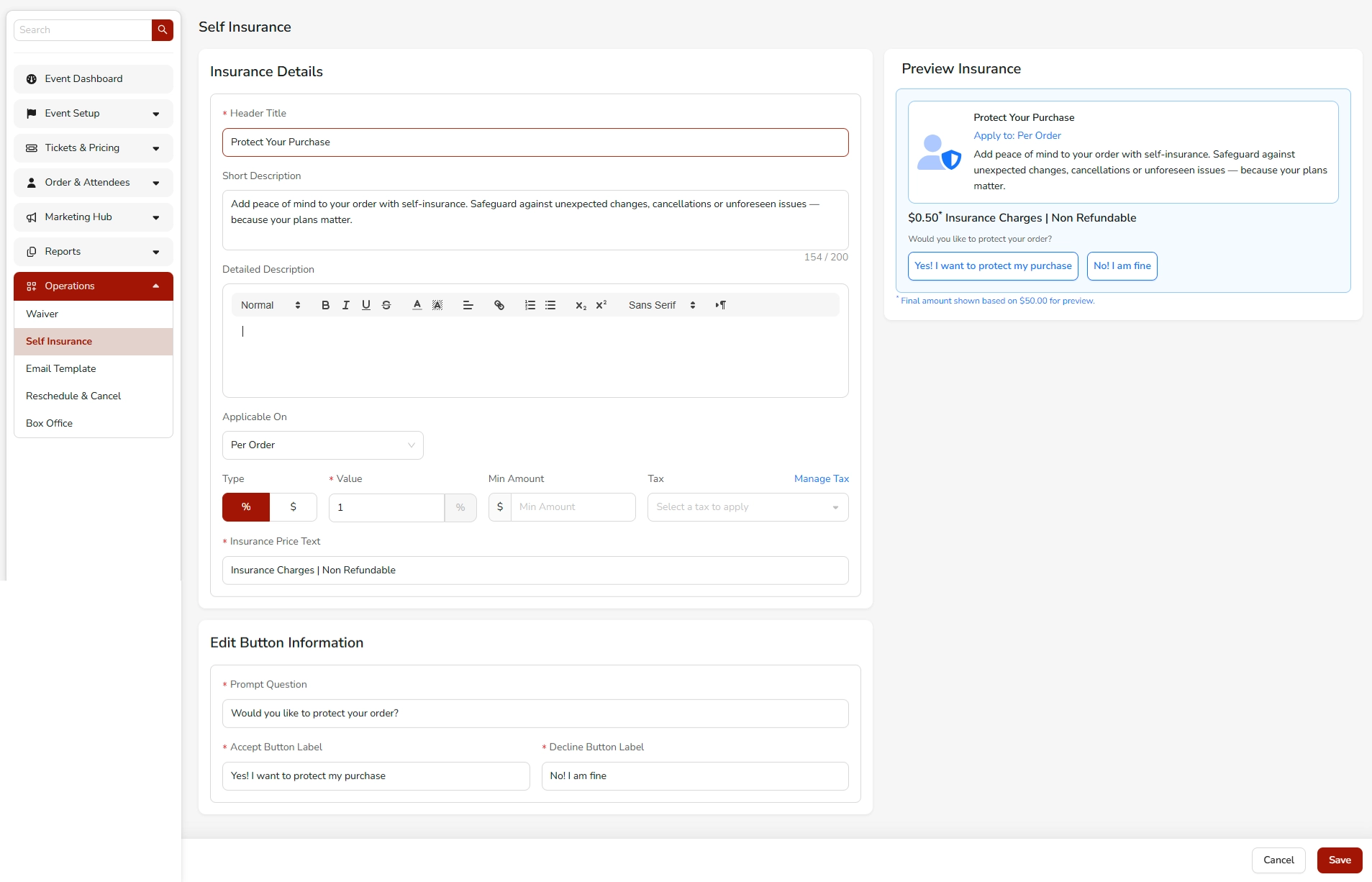
A: When creating a Self Insurance policy, you'll need to provide:
- Header Title - The name displayed to buyers (e.g., Protect Your Purchase)
- Short Description - A brief summary shown in the insurance prompt (max 200 characters)
- Detailed Description - A rich-text field for full policy details
- Applicable On - Choose whether insurance applies Per Order or Per Ticket
- Type & Value - Set the insurance fee as a percentage (%) or flat dollar amount ($)
- Min Amount - Optional minimum charge threshold
- Tax - Optionally apply a tax via the Manage Tax option
- Insurance Price Text - Label shown next to the price (e.g., Insurance Charges | Non Refundable)
Q: What is the "Applicable On" setting?
A: This determines how the insurance fee is calculated:
- Per Order - A single insurance fee is applied to the entire order, regardless of the number of tickets.
- Per Ticket - The insurance fee is applied to each individual ticket in the order.
Q: How do I set the insurance price?
A: Under the Type & Value section:
- Select % to charge a percentage of the ticket/order price.
- Select $ to charge a flat fixed amount.
Enter the value in the Value field. You can also set a Min Amount to ensure a minimum charge is always applied.
Q: What is the "Insurance Price Text" field?
A: This is the label that appears next to the insurance price on the buyer-facing checkout prompt. A common example is:
Insurance Charges | Non Refundable
This helps set clear expectations for the buyer that the fee is non-refundable.
Buyer-Facing Experience
Q: What does the buyer see at checkout?
A: Buyers will see an insurance prompt that includes:
- The Header Title (e.g., Protect Your Purchase)
- The Apply to label (e.g., Per Order)
- The Short Description
- The insurance price with your custom price text
- A Prompt Question (e.g., Would you like to protect your order?)
- Two buttons: an Accept Button and a Decline Button
Q: Can I customize the accept and decline button labels?
A: Yes! Under the Edit Button Information section, you can customize:
- Prompt Question - The question shown to the buyer (e.g., Would you like to protect your order?)
- Accept Button Label - Text for the accept action (e.g., Yes! I want to protect my purchase)
- Decline Button Label - Text for the decline action (e.g., No! I am fine)
Q: Is the insurance price shown to buyers final?
A: The price shown in the Preview Insurance panel is a sample based on a $50.00 order. The final amount displayed to buyers will vary based on the actual order or ticket price at checkout.
Best Practices
Q: What are some tips for writing good insurance copy?
A:
- Keep the Short Description concise and reassuring. Example: Add peace of mind to your order with self-insurance. Safeguard against unexpected changes, cancellations or unforeseen issues - because your plans matter.
- Be transparent in the Insurance Price Text if the fee is non-refundable.
- Use clear, action-oriented language for your Accept Button to encourage opt-in.
- Use a soft, non-pressuring tone for the Decline Button (e.g., No! I am fine).
Q: Should I use "Per Order" or "Per Ticket" pricing?
A:
- Use Per Order if you want to offer a single flat or percentage-based protection for the whole purchase - this feels simpler to buyers.
- Use Per Ticket if your event has high per-ticket value and buyers may want individual ticket-level protection.
Q: Where can I preview what the insurance will look like to buyers?
A: As you fill in the insurance details, a live Preview Insurance panel appears on the right side of the setup page. This gives you a real-time look at the buyer-facing prompt before saving.
Was this article helpful?
That’s Great!
Thank you for your feedback
Sorry! We couldn't be helpful
Thank you for your feedback
Feedback sent
We appreciate your effort and will try to fix the article